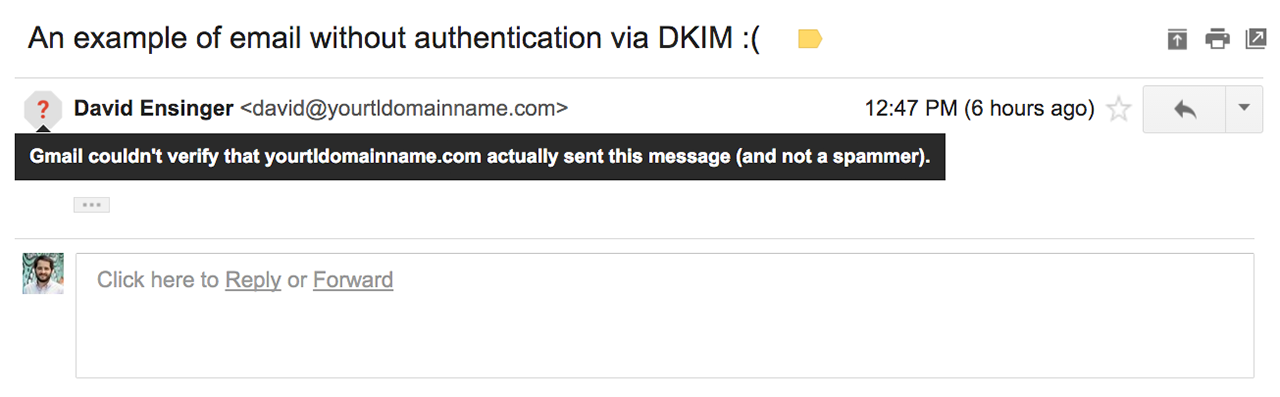
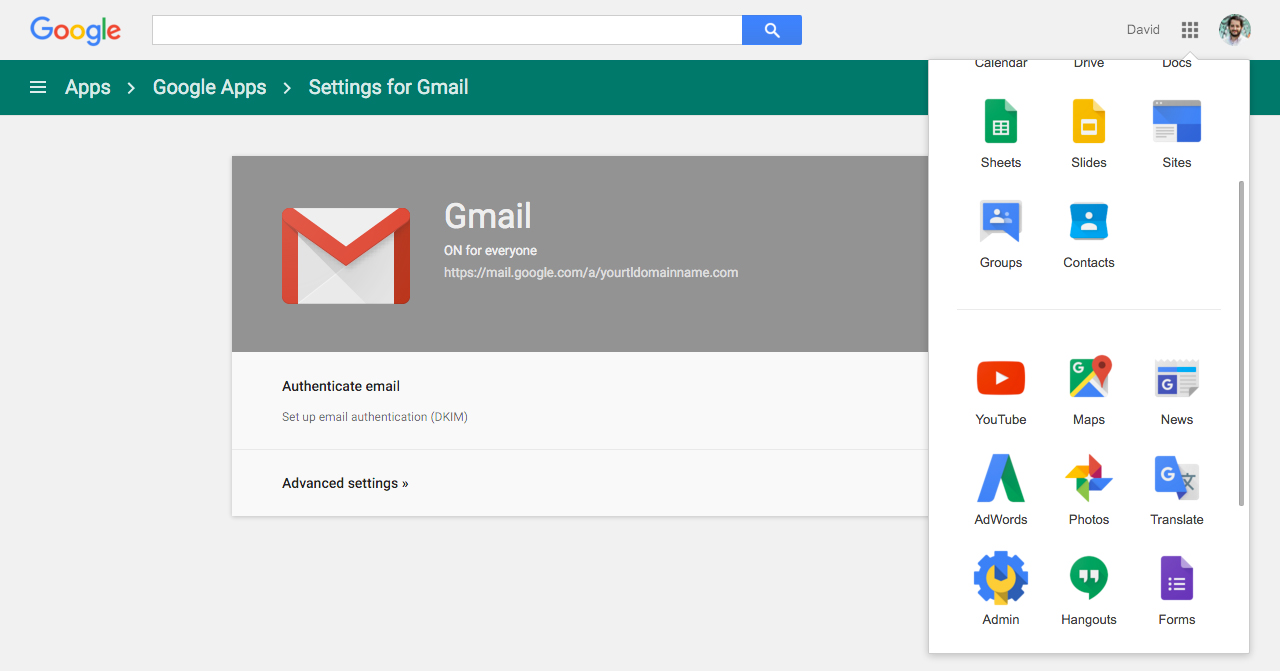
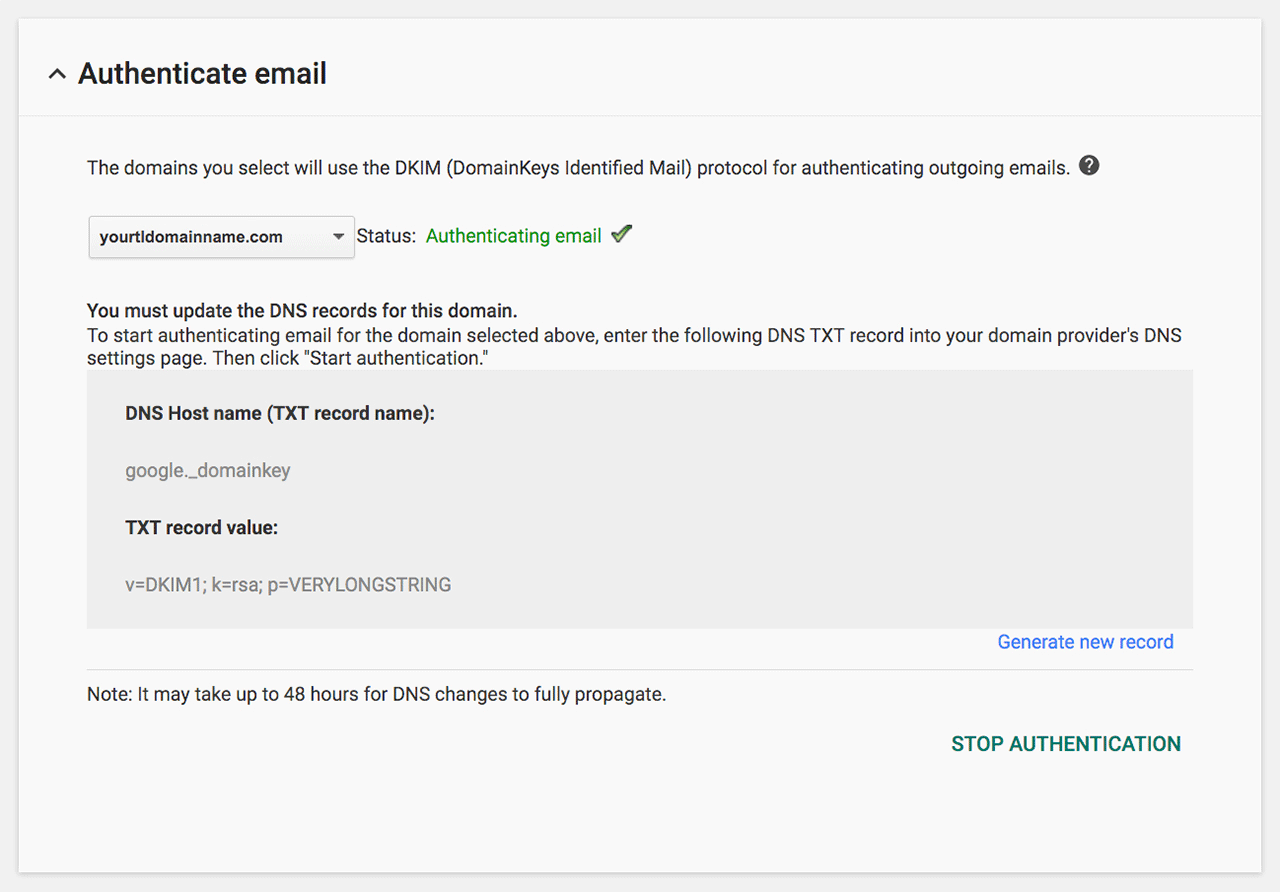
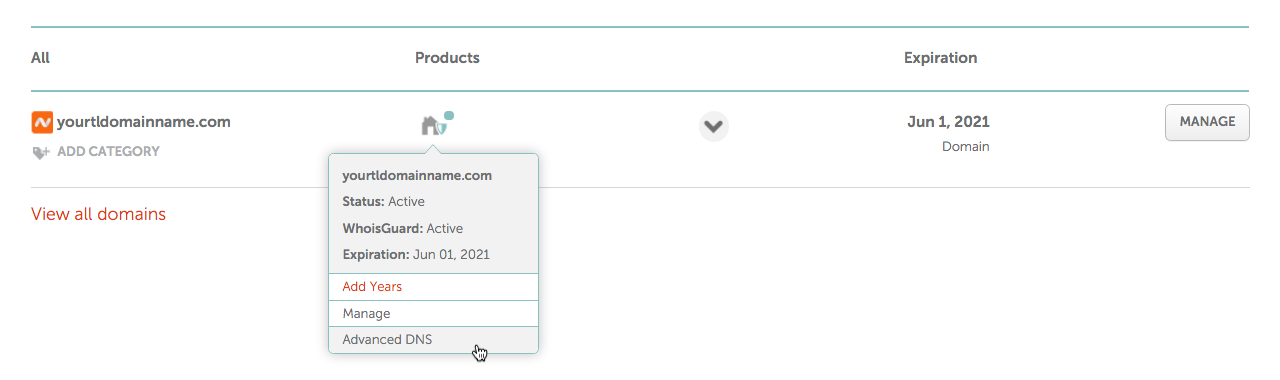
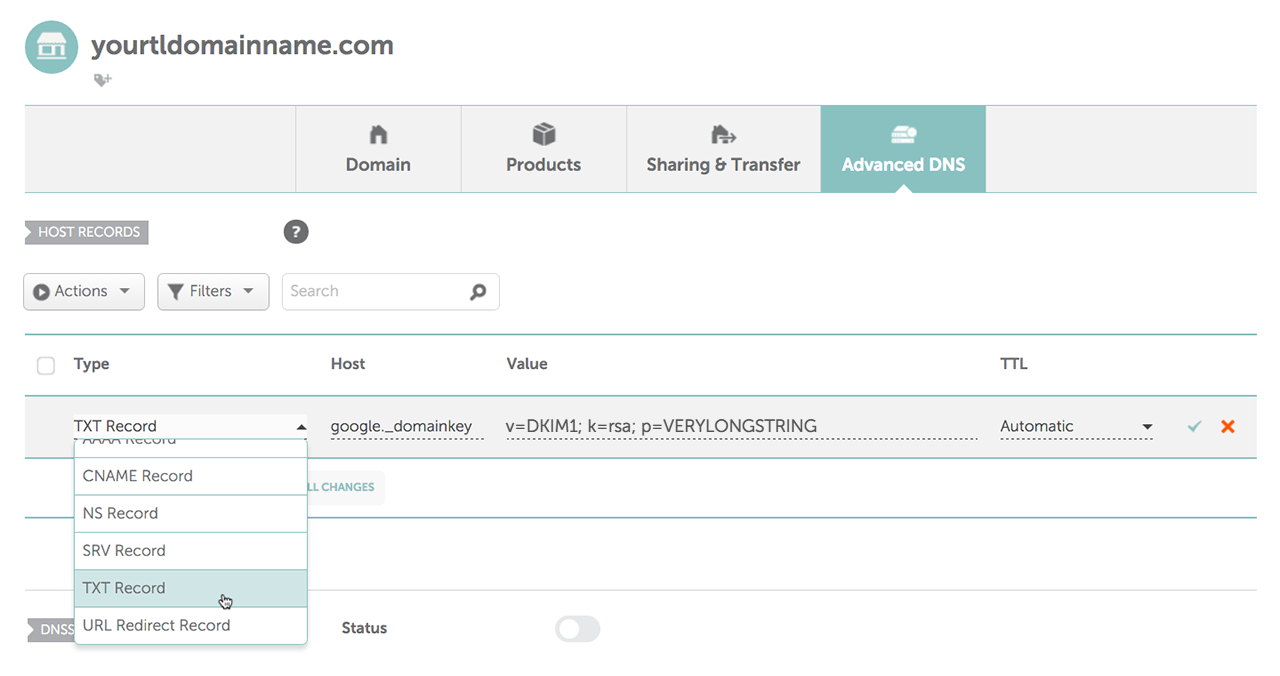
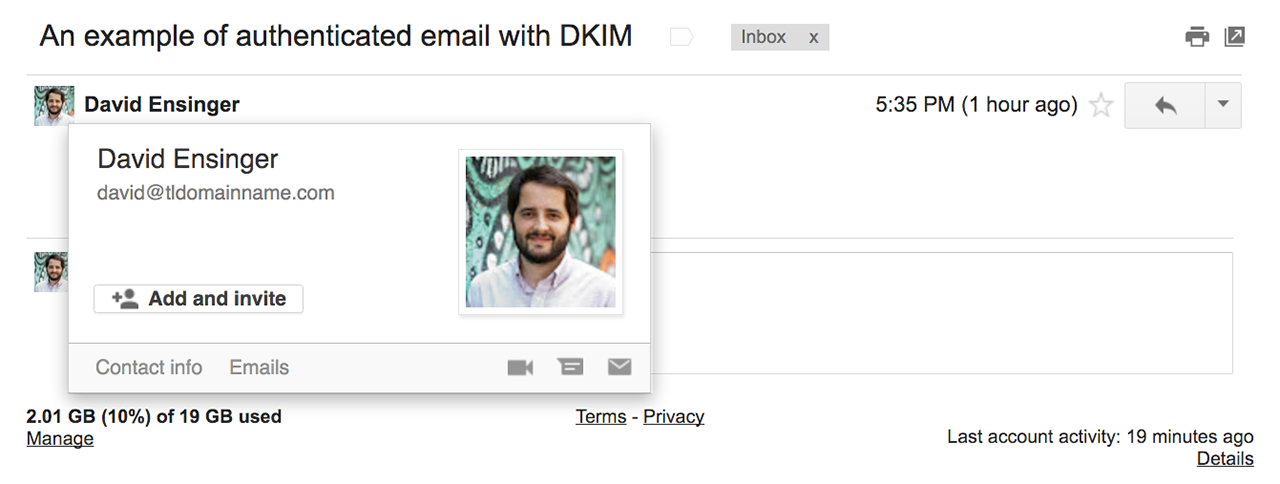
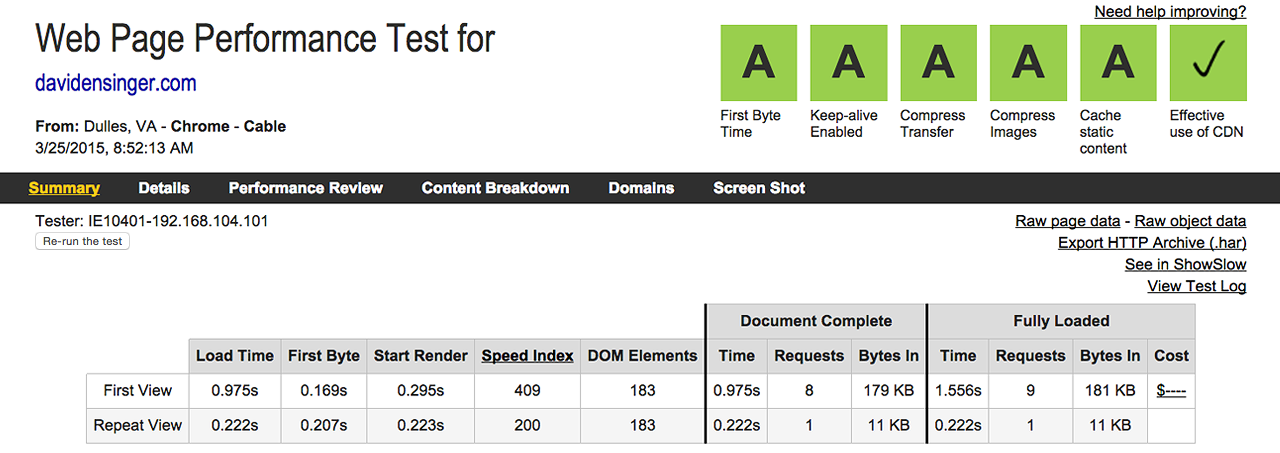
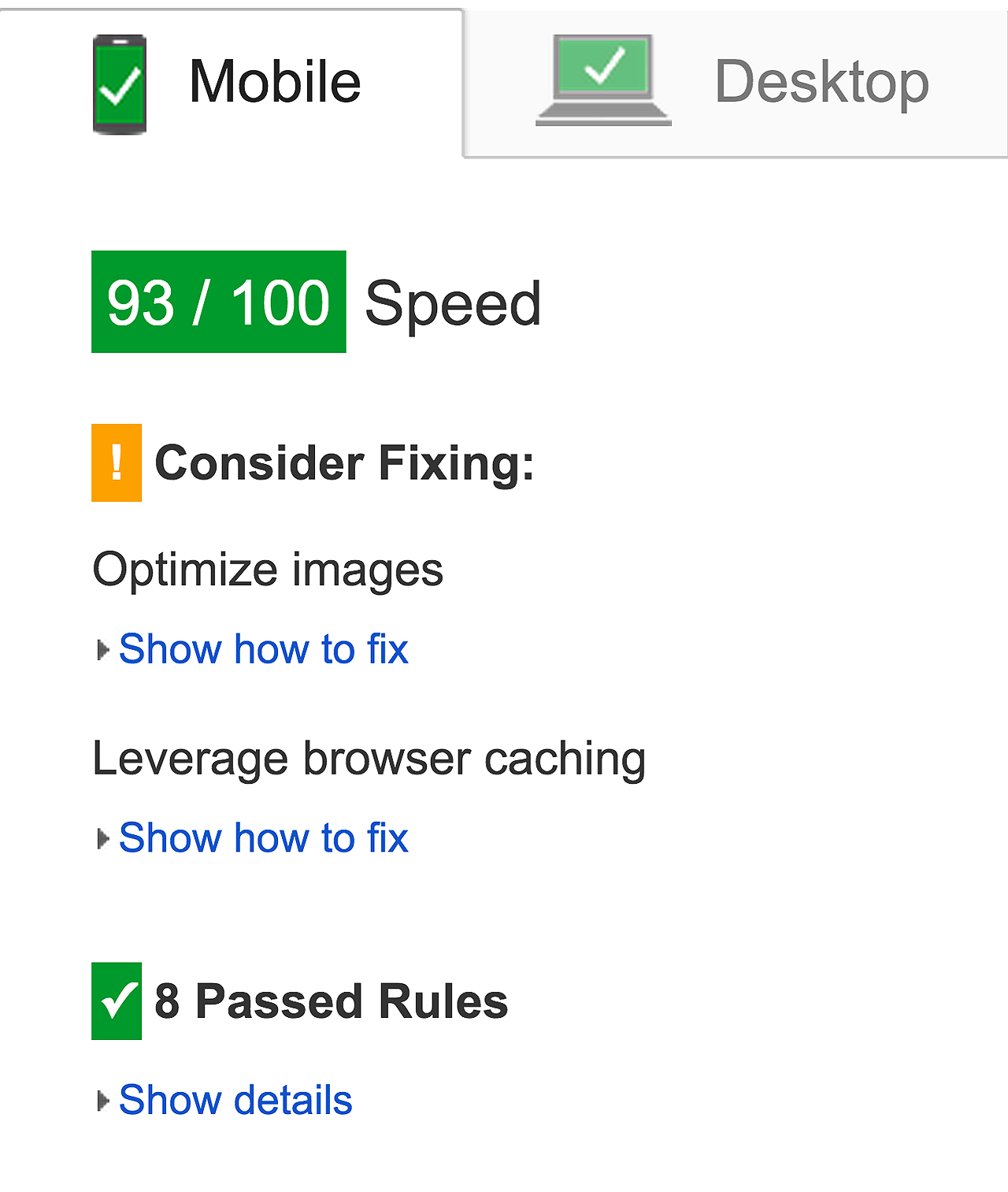
<?xml version="1.0" encoding="utf-8"?><feed xmlns="http://www.w3.org/2005/Atom"><title type="text" xml:lang="en">Development, design, and more by @DavidEnsinger</title><link type="application/atom+xml" rel="self" href="http://davidensinger.com/atom.xml"/><link href="http://davidensinger.com/"/><id>http://davidensinger.com/</id><updated>2017-10-28T16:30:49Z</updated><author><name>David Ensinger</name><email>hello@davidensinger.com</email></author><rights type="text">Copyright © 2017 David Ensinger. All rights reserved.</rights><entry><title type="text">Authenticate your Google Apps’ Gmail with DKIM and Namecheap DNS</title><link rel="alternate" type="text/html" href="http://davidensinger.com/2016/03/google-apps-dkim-authentication-with-namecheap-dns/" /><id>http://davidensinger.com/2016/03/google-apps-dkim-authentication-with-namecheap-dns</id><published>2016-03-20T15:23:00Z</published><updated>2016-03-20T15:23:00Z</updated><content type="html"><![CDATA[ <p>In February <a href="https://gmail.googleblog.com/2016/02/making-email-safer-for-you-posted-by.html">Gmail began displaying a warning icon</a>, instead of the usual contact photo, to denote an email sent from an unauthenticated domain. This change affected several of my domains, all of which use Google Apps for their email. The recommended fix is to add <a href="http://www.dkim.org/">DKIM</a> authentication to my emails, which required the addition of a TXT record to my DNS.</p><div class="yellow-box"><p><strong>Please Note:</strong> Google recently <a href="http://googleappsupdates.blogspot.com/2016/05/getting-rid-of-spoofers-digitally-sign.html">upgraded their DKIM keys to be 2048-bit</a>.</p><p>Unfortunately Namecheap doesn’t yet support the longer key length, although they say that they’re working on it. In response Google Apps now allows for the <a href="http://superuser.com/questions/1065788/using-a-410-character-dkim-txt-record-on-namecheap#answer-1077633">shorter 1024 key bit length</a>, which I was (and am) using before the upgrade.</p><p>I look forward to upgrading my DKIM key to be 2048-bit and will update this post after Namecheap supports it.</p><p>Also a big thanks to the folks who brought this to my attention via Twitter: <a href="https://twitter.com/jmbase">@jmbase</a>, <a href="https://twitter.com/amanjeev">@amanjeev</a>, and <a href="https://twitter.com/mattdebouge">@mattdebouge</a>.</p></div><p>Here are the steps I took to make this happen with my favorite domain registrar, <a href="https://namecheap.pxf.io/c/477139/386170/5618">Namecheap</a>. If your DNS is elsewhere, fear not, as these steps apply to other registrars (and DNS hosts) too.</p><div class="yellow-box"><p><strong>Please Note:</strong> You may also want to consult this post, <a href="https://support.google.com/a/answer/174124">Authenticate email with DKIM</a>, while you set this up.</p></div><h2 id="unauthenticated-email">Unauthenticated Email</h2><p>This is an example of what I was unknowingly sending folks:</p><p><img src="/img/srcset/2016-03-20-gmail-email-without-authentication-via-dkim.png" alt="An unauthenticated email" class="media-full srcset-full" /></p><h2 id="the-google-apps-gmail-admin-area">The Google Apps Gmail Admin Area</h2><p>The first step is to login as the administrator to your Google Apps account. I seldom change any of the settings, so I always feel a little lost trying to find the right page. Here’s the path, current as of the publishing of this post:</p><figure class="highlight"><pre><code class="language-html" data-lang="html">Admin (or Admin console &gt; Apps &gt; Google Apps &gt; Gmail &gt; Authenticate email</code></pre></figure><p>Here is an edited (for clarity, I hope) photo that shows you the general area of the settings that you want:</p><p><img src="/img/srcset/2016-03-20-google-apps-settings-for-gmail.jpg" alt="The admin area of Gmail for Google Apps" class="media-full srcset-full" /></p><h3 id="generate-the-domain-key">Generate the Domain Key</h3><p>Some things to note here:</p><ol><li>Select the desired domain</li><li>Generate a new record and optionally edit the DKIM selector prefix. I kept mine as “google” because I don’t have very many records in my DNS.</li><li>Please note that there will be a very long alphanumeric string, although I’ve edited my screenshot to just read “VERYLONGSTRING”</li><li>Also ignore the fact that this screenshot confirms that the authentication works. I should have taken an inital screenshot, but neglected to do so. Once I had it working I didn’t want to turn it off.</li></ol><p><img src="/img/srcset/2016-03-20-google-apps-settings-authenticate-email-success.png" alt="Successful authentication of the TXT record" class="media-full srcset-full" /></p><h2 id="the-namecheap-dashboard">The Namecheap Dashboard</h2><p>Now that you’ve got the two required values, you’ll want to log into <a href="https://namecheap.pxf.io/c/477139/386170/5618">Namecheap</a> to navigate to the “Advanced DNS” for your domain:</p><p><img src="/img/srcset/2016-03-20-namecheap-dashboard-advanced-dns.png" alt="How to navigate to the Advanced DNS" class="media-full srcset-full" /></p><h3 id="adding-a-txt-record">Adding a TXT Record</h3><p>Once there, click the “Add New Record” button and select “TXT Record” from the dropdown menu. Paste the appropriate values into the “Host” and “Value” fields and then save them with the green “✓” icon.</p><p><img src="/img/srcset/2016-03-20-advanced-dns-txt-record-values.png" alt="Add the TXT record to the Advanced DNS" class="media-full srcset-full" /></p><h2 id="successful-authentication">Successful Authentication</h2><p>Once the DNS propagates, you’ll see the green “Authenticating email ✓” (see my above screenshot) and you’ll be good to go, err authenticate!</p><p><img src="/img/srcset/2016-03-20-gmail-authenticated-email-with-dkim.png" alt="An authenticated email with DKIM" class="media-full srcset-full" /></p><br><hr><p>You’ve just read about <strong><a href="http://davidensinger.com/2016/03/google-apps-dkim-authentication-with-namecheap-dns/">Authenticate your Google Apps’ Gmail with DKIM and Namecheap DNS</a></strong> on <strong><a href="http://davidensinger.com/">Development, design, and more by @DavidEnsinger</a></strong>.</p><p>If you’d prefer to receive your updates in tweet form, please follow me on <strong><a href="https://twitter.com/DavidEnsinger">Twitter</a></strong>, otherwise I hope you’re enjoying the feed!</p>
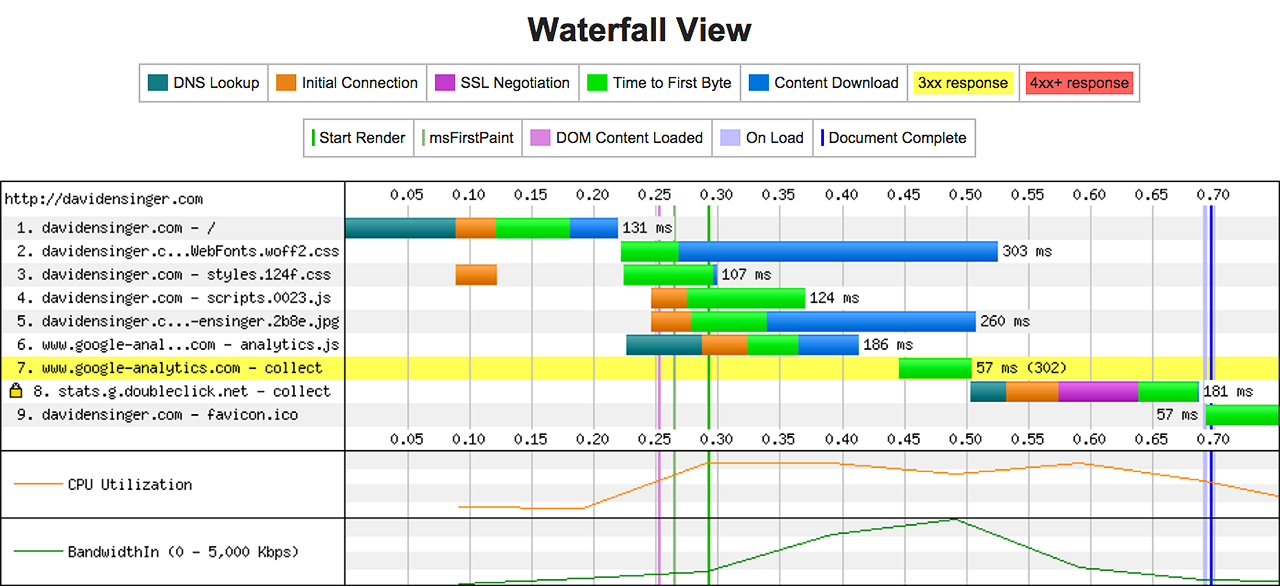
 ]]></content></entry><entry><title type="text">Performant Websites with Jekyll, Grunt, GitHub Pages, and CloudFlare</title><link rel="alternate" type="text/html" href="http://davidensinger.com/2015/01/performant-websites-with-jekyll-grunt-github-pages-and-cloudflare/" /><id>http://davidensinger.com/2015/01/performant-websites-with-jekyll-grunt-github-pages-and-cloudflare</id><published>2015-01-10T09:23:00Z</published><updated>2015-01-10T09:23:00Z</updated><content type="html"><![CDATA[ <p>Over the past year I’ve been slowly improving the performance of this website and <a href="http://webworke.rs">Webworke.rs</a>.</p><p>I’ve put a lot of work into my sites, but many of the performance improvements couldn’t have been made so easily without the great ecosystem of open source software and free services available to me. To say that I’m thankful for this is a gross understatement.</p><p>Both of my sites are built with a combination of <a href="http://jekyllrb.com/">Jekyll</a> and <a href="http://gruntjs.com/">Grunt</a>. They’re hosted on <a href="https://pages.github.com/">GitHub Pages</a> and their DNS is served by <a href="https://www.cloudflare.com/">CloudFlare</a>. I wholeheartedly endorse this tech stack for anyone wanting a static website.</p><p>What follows is an overview of some performance best practices and how I’ve been able to adhere to them with my development and production setup.</p><h2 id="html">HTML</h2><h3 id="minify-html">Minify HTML</h3><p>The HTML gets minified by <a href="https://github.com/gruntjs/grunt-contrib-htmlmin">grunt-contrib-htmlmin</a>, which collapses whitespace and removes comments, amongst other small improvements.</p><ul><li>It also minifies inline JavaScript (with <a href="https://github.com/mishoo/UglifyJS2">UglifyJS</a>) and inline CSS (with <a href="https://github.com/jakubpawlowicz/clean-css">clean-css</a>)</li><li>And there’s an option to <code class="highlighter-rouge">keepClosingSlash</code>, which are needed for my inline SVGs.</li></ul><h2 id="css">CSS</h2><h3 id="lint-css">Lint CSS</h3><p>My Sass is linted with <a href="https://github.com/ahmednuaman/grunt-scss-lint">grunt-scss-lint</a>, which ensures that I don’t introduce any inconsistencies, poor practices, or general cruft into my CSS. This results in a well organized stylesheet.</p><h3 id="use-autoprefixer">Use Autoprefixer</h3><p>All the vendor prefixes are managed by <a href="https://github.com/nDmitry/grunt-autoprefixer">grunt-autoprefixer</a> so that I have effortless control over which browsers I support when writing my CSS. I no longer need to worry about having unnecessary vendor prefixes in my CSS rules.</p><h3 id="concatenate-css">Concatenate CSS</h3><p>The CSS is written in <a href="http://sass-lang.com/">Sass</a> and organized via partials that compile to one stylesheet. If my CSS were in multiple files, I’d use <a href="https://github.com/yeoman/grunt-usemin">grunt-usemin</a> to send those files to <a href="https://github.com/gruntjs/grunt-contrib-concat">grunt-contrib-concat</a> for concatenation.</p><h3 id="sort-css">Sort CSS</h3><p>My compiled CSS is sorted with <a href="https://github.com/csscomb/grunt-csscomb">grunt-csscomb</a> to improve gzip compression, although my styles are lean enough that this hasn’t made any difference.</p><p>Read about the benefits of sorting CSS properties at <a href="http://peteschuster.com/2014/12/reduce-file-size-css-sorting/">Reduce file size with CSS Sorting</a>.</p><h3 id="minify-css">Minify CSS</h3><p>The CSS gets minified by <a href="https://github.com/gruntjs/grunt-contrib-cssmin">grunt-contrib-cssmin</a>, which uses <a href="https://github.com/jakubpawlowicz/clean-css">clean-css</a> under the hood.</p><h3 id="inline-critical-css">Inline Critical CSS</h3><p>The above the fold CSS is generated with <a href="https://github.com/fatso83/grunt-penthouse">grunt-penthouse</a> and inlined into the <code class="highlighter-rouge">&lt;head&gt;</code> with an include.</p><h3 id="load-css-asynchronously">Load CSS Asynchronously</h3><p>The whole stylesheet is loaded asynchronously with <a href="https://github.com/filamentgroup/loadCSS">loadCSS</a>. An improvement could be made here to only load the styles that weren’t inlined, although I haven’t found a good way to do that.</p><h2 id="fonts">Fonts</h2><p>I only support the WOFF and <a href="https://gist.github.com/sergejmueller/cf6b4f2133bcb3e2f64a">WOFF2</a> font formats and have them asynchronously loaded with <a href="https://github.com/bdadam/OptimizedWebfontLoading">fontloader.js</a> (and its loadFont() function) so that they’re no longer blocking the page from loading.</p><p>More information about this technique (and related ones) at <a href="http://bdadam.com/blog/better-webfont-loading-with-localstorage-and-woff2.html">Better webfont loading with using localStorage and providing WOFF2 support</a>.</p><h2 id="javascript">JavaScript</h2><h3 id="lint-javascript">Lint JavaScript</h3><p>My JavaScript is validated with <a href="https://github.com/gruntjs/grunt-contrib-jshint">grunt-contrib-jshint</a>, which helps ensure that its error free. I also don’t have very much of it since my websites are relatively simple functionality-wise.</p><h3 id="concatenate-javascript">Concatenate JavaScript</h3><p>I use <a href="https://github.com/yeoman/grunt-usemin">grunt-usemin</a> to send my JavaScript files to <a href="https://github.com/gruntjs/grunt-contrib-concat">grunt-contrib-concat</a> for concatenation.</p><h3 id="minify-javascript">Minify JavaScript</h3><p>A plugin of many talents, <a href="https://github.com/yeoman/grunt-usemin">grunt-usemin</a> sends the JavaScript to <a href="https://github.com/gruntjs/grunt-contrib-uglify">grunt-contrib-uglify</a> to be minified.</p><h3 id="load-javascript-last">Load JavaScript Last</h3><p>Save for the aforementioned loadCSS() and loadFont() functions, the rest of my JavaScript is loaded just before the closing <code class="highlighter-rouge">&lt;/body&gt;</code> tag.</p><h2 id="images">Images</h2><h3 id="optimize-images">Optimize Images</h3><p>For this website, I use <a href="https://github.com/gruntjs/grunt-contrib-imagemin">grunt-contrib-imagemin</a> to compress the size of my images. For Webworke.rs I use <a href="https://github.com/JamieMason/grunt-imageoptim">grunt-imageoptim</a> and find the latter plugin results in smaller filesizes.</p><h3 id="serve-scaled-images">Serve Scaled Images</h3><p>For Webworke.rs I’ve implemented <a href="https://github.com/robwierzbowski/jekyll-picture-tag">jekyll-picture-tag</a> and that allows me to use the <code class="highlighter-rouge">&lt;picture&gt;</code> element with <a href="https://github.com/scottjehl/picturefill">picturefill</a> polyfill.</p><h2 id="svg">SVG</h2><h3 id="minify-svgs">Minify SVGs</h3><p>My SVGs get minified by <a href="https://github.com/sindresorhus/grunt-svgmin">grunt-svgmin</a>, although I also do some editing by hand before committing them into version control.</p><h3 id="inline-svgs">Inline SVGs</h3><p>I inline all my SVGs with Jekyll, so I save requests at the expense of browsers I don’t support. I’d consider using <a href="https://github.com/filamentgroup/grunticon">grunticon</a> for less feature rich browsers.</p><h2 id="server">Server</h2><h3 id="hosting-on-github-pages">Hosting on GitHub Pages</h3><p>In and of itself, GitHub Pages is incredibly fast and reliable, as well as free! It makes a lot of sense to take advantage of the hosting, especially when your site’s source code is already put into version control and stored on GitHub.</p><h3 id="cloudflare-for-everything-else">CloudFlare for Everything Else</h3><p>I host my DNS with CloudFlare, which opens up a whole world of server-side optimizations. I get my site served by a CDN, compression of my assets via gzip, the ability to set the TTL for static resources (the whole site, basically) for browser caching, and SSL (even though the connection from GitHub Pages to CloudFlare is unencrypted, but hey beggars can’t be choosers).</p><h2 id="results">Results</h2><h3 id="webpagetest">WebPagetest</h3><p><img src="/img/srcset/2015-01-15-webpagetest.png" alt="Webpagetest.org results for davidensinger.com" class="media-full srcset-full" /></p><h3 id="google-pagespeed-insights">Google PageSpeed Insights</h3><p><img src="/img/srcset/2015-01-15-google-pagespeed-insights-mobile.png" alt="Google PageSpeed Insights results for davidensinger.com" class="media-half-to-third srcset-half-to-third" /></p><h3 id="yslow">YSlow</h3><p><img src="/img/srcset/2015-01-15-yslow.png" alt="YSlow results for davidensinger.com" class="media-full srcset-full" /></p><h2 id="todo">Todo</h2><p>I still have work to do and the following is my shortlist of improvements to implement in these coming months:</p><ul><li>lazy load my images</li><li>switch to grunt-imageoptim (for this site)</li><li>start using the <code class="highlighter-rouge">srcset</code> by finding a good workflow to generate the images and markup</li></ul><br><hr><p>You’ve just read about <strong><a href="http://davidensinger.com/2015/01/performant-websites-with-jekyll-grunt-github-pages-and-cloudflare/">Performant Websites with Jekyll, Grunt, GitHub Pages, and CloudFlare</a></strong> on <strong><a href="http://davidensinger.com/">Development, design, and more by @DavidEnsinger</a></strong>.</p><p>If you’d prefer to receive your updates in tweet form, please follow me on <strong><a href="https://twitter.com/DavidEnsinger">Twitter</a></strong>, otherwise I hope you’re enjoying the feed!</p>
 ]]></content></entry><entry><title type="text">Critical Path CSS in Jekyll with Penthouse and loadCSS</title><link rel="alternate" type="text/html" href="http://davidensinger.com/2014/12/critical-path-css-in-jekyll-with-penthouse-and-loadcss/" /><id>http://davidensinger.com/2014/12/critical-path-css-in-jekyll-with-penthouse-and-loadcss</id><published>2014-12-14T10:14:00Z</published><updated>2014-12-14T10:14:00Z</updated><content type="html"><![CDATA[ <p>With every passing month more and more people are browsing the internet via their mobile devices. It only makes sense for us as developers to optimize our sites for those visitors, who may be using an unreliable or slow internet connection when visiting our sites.</p><p>There are <a href="https://developers.google.com/speed/docs/insights/rules">many optimizations</a> one can make, but this post will focus on elimating blocking CSS requests from the <code class="highlighter-rouge">&lt;head&gt;</code> by inlining the above-the-fold CSS and then asynchronously loading the site’s stylesheet. We’ll do this with the following tools:</p><ul><li><a href="https://github.com/fatso83/grunt-penthouse">grunt-penthouse</a>, a wrapper for <a href="https://github.com/pocketjoso/penthouse">Penthouse</a>, a tool for generating critical path CSS</li><li><a href="https://github.com/filamentgroup/loadCSS">loadCSS</a>, a function for loading CSS asynchronously.</li></ul><p>As <a href="http://davidensinger.com/2014/11/ode-to-grunt-yeoman-and-generator-jekyllrb/">previously covered</a>, this site was scaffolded by <a href="https://github.com/robwierzbowski/generator-jekyllrb">Generator-jekyllrb</a>, a Yeoman generator for building sites with Jekyll. What follows is my implementation, which should be of interest for others with similar development setups for Jekyll.</p><h2 id="generate-the-css">Generate the CSS</h2><p>The first step is to install grunt-penthouse and configure the task in the <strong>Gruntfile</strong>.</p><figure class="highlight"><pre><code class="language-js" data-lang="js"><span class="nx">watch</span><span class="err">:</span><span class="p">{</span><span class="nl">sass</span><span class="p">:</span><span class="p">{</span><span class="nl">files</span><span class="p">:</span><span class="p">[</span><span class="s1">'&lt;%= yeoman.app %&gt;/_scss/**/*.scss'</span><span class="p">],</span><span class="nx">tasks</span><span class="err">:</span><span class="p">[</span><span class="s1">'sass'</span><span class="p">,</span><span class="s1">'autoprefixer:server'</span><span class="p">,</span><span class="s1">'penthouse'</span><span class="p">]</span><span class="p">}</span><span class="p">}</span><span class="nl">penthouse</span><span class="p">:</span><span class="p">{</span><span class="nl">server</span><span class="p">:</span><span class="p">{</span><span class="nl">outfile</span><span class="p">:</span><span class="s1">'&lt;%= yeoman.app %&gt;/_includes/critical.css'</span><span class="p">,</span><span class="nx">css</span><span class="err">:</span><span class="s1">'.tmp/css/styles.css'</span><span class="p">,</span><span class="nx">url</span><span class="err">:</span><span class="s1">'http://localhost:3000'</span><span class="p">,</span><span class="nx">width</span><span class="err">:</span><span class="mi">1280</span><span class="p">,</span><span class="nx">height</span><span class="err">:</span><span class="mi">800</span><span class="p">}</span><span class="p">}</span></code></pre></figure><p>I run the <code class="highlighter-rouge">penthouse</code> task after any change to my Sass files, which ensures that my critical path CSS is up-to-date. This works out well because it doesn’t make my workflow any more complicated than it needs to be.</p><p>The <strong>critical.css</strong> is saved in my <strong>_includes</strong> directory, which allows me to easily inline it into my site’s markup. I’ve also added the CSS to my <strong>.gitignore</strong>, since there’s no benefit to versioning it.</p><p>I’ve elected to generate the critical CSS with dimensions that are desktop first, which may seem counterintuitive. I’m doing this to ensure that I get the CSS that’s required for my site’s sidebar. On a mobile device it’s most likely below-the-fold, but on a wider viewport it displays above-the-fold.</p><p>Your website design will obviously differ from my own, so it would be prudent to test out different dimensions when generating the critical path CSS.</p><h2 id="inline-the-css">Inline the CSS</h2><p>In my <strong>header.html</strong> include I’ve inlined the critical CSS and then added the loadCSS function, which will asynchronously load my stylesheet.</p><figure class="highlight"><pre><code class="language-html" data-lang="html">{% if site.environment == 'production' %}
    <span class="nt">&lt;style&gt;</span><span class="p">{</span><span class="err">%</span><span class="err">include</span><span class="err">critical.css</span><span class="err">%</span><span class="p">}</span><span class="nt">&lt;/style&gt;</span><span class="nt">&lt;script&gt;</span><span class="p">{</span><span class="o">%</span><span class="nx">include</span><span class="nx">loadCSS</span><span class="p">.</span><span class="nx">js</span><span class="o">%</span><span class="p">}</span><span class="nx">loadCSS</span><span class="p">(</span><span class="s2">"/css/styles.css"</span><span class="p">);</span><span class="nt">&lt;/script&gt;</span><span class="nt">&lt;noscript&gt;</span>
{% endif %}

<span class="c">&lt;!-- build:css({app,.tmp}) /css/styles.css --&gt;</span><span class="nt">&lt;link</span><span class="na">href=</span><span class="s">"/css/styles.css"</span><span class="na">rel=</span><span class="s">"stylesheet"</span><span class="na">type=</span><span class="s">"text/css"</span><span class="nt">&gt;</span><span class="c">&lt;!-- endbuild --&gt;</span>

{% if site.environment == 'production' %}
    <span class="nt">&lt;/noscript&gt;</span>
{% endif %}</code></pre></figure><p>You can see that I make use of a faux environmental variable to conditionally print markup.</p><p>My “development” environment is provided courtesy of <code class="highlighter-rouge">grunt serve</code>, while my “production” environment is <code class="highlighter-rouge">grunt build</code>. These variables are saved in their respective <strong>_config</strong> files.</p><p>I only inline my above-the-fold CSS, print the markup to asynchronously load my stylesheet, and wrap my <code class="highlighter-rouge">&lt;link&gt;</code> tag with a <code class="highlighter-rouge">&lt;noscript&gt;</code> when I’m ready to build the site for deployment.</p><h2 id="filerev-the-css">Filerev the CSS</h2><p>The stylesheet in our <a href="https://github.com/yeoman/grunt-usemin">usemin</a> block will be <a href="https://github.com/yeoman/grunt-filerev">revved</a>, which requires a corresponding revving of the stylesheet within the loadCSS function. This can be resolved with a regular expression in a custom usemin pattern.</p><figure class="highlight"><pre><code class="language-js" data-lang="js"><span class="nx">usemin</span><span class="err">:</span><span class="p">{</span><span class="nl">options</span><span class="p">:</span><span class="p">{</span><span class="nl">assetsDirs</span><span class="p">:</span><span class="s1">'&lt;%= yeoman.dist %&gt;'</span><span class="p">,</span><span class="nx">patterns</span><span class="err">:</span><span class="p">{</span><span class="nl">html</span><span class="p">:</span><span class="p">[</span><span class="p">[</span><span class="sr">/loadCSS</span><span class="se">\([</span><span class="sr">'"</span><span class="se">]([^</span><span class="sr">"'</span><span class="se">]</span><span class="sr">+</span><span class="se">)[</span><span class="sr">'"</span><span class="se">]\)</span><span class="sr">/gm</span><span class="p">,</span><span class="s1">'Replacing reference to CSS within loadCSS'</span><span class="p">]</span><span class="p">]</span><span class="p">}</span><span class="p">},</span><span class="nx">html</span><span class="err">:</span><span class="p">[</span><span class="s1">'&lt;%= yeoman.dist %&gt;/**/*.html'</span><span class="p">],</span><span class="nx">css</span><span class="err">:</span><span class="p">[</span><span class="s1">'&lt;%= yeoman.dist %&gt;/css/**/*.css'</span><span class="p">]</span><span class="p">}</span></code></pre></figure><p>Please note that until grunt-usemin 3.0.0, a custom pattern with the same name as a default pattern would replace it, instead of merging it.</p><h2 id="in-summary">In Summary</h2><p>Those were the highlights! Feel free to dig through <a href="https://github.com/davidensinger/davidensinger.github.io">this site’s repository</a> for more context regarding these example snippets of code.</p><p>Also, a big thanks to the developers of <a href="https://github.com/pocketjoso/penthouse">Penthouse</a>, <a href="https://github.com/fatso83/grunt-penthouse">grunt-penthouse</a>, and <a href="https://github.com/filamentgroup/loadCSS">loadCSS</a> for simplifying what could potentially be a very complicated workflow.</p><br><hr><p>You’ve just read about <strong><a href="http://davidensinger.com/2014/12/critical-path-css-in-jekyll-with-penthouse-and-loadcss/">Critical Path CSS in Jekyll with Penthouse and loadCSS</a></strong> on <strong><a href="http://davidensinger.com/">Development, design, and more by @DavidEnsinger</a></strong>.</p><p>If you’d prefer to receive your updates in tweet form, please follow me on <strong><a href="https://twitter.com/DavidEnsinger">Twitter</a></strong>, otherwise I hope you’re enjoying the feed!</p>
 ]]></content></entry><entry><title type="text">Ode to Grunt, Yeoman, and Generator-jekyllrb</title><link rel="alternate" type="text/html" href="http://davidensinger.com/2014/11/ode-to-grunt-yeoman-and-generator-jekyllrb/" /><id>http://davidensinger.com/2014/11/ode-to-grunt-yeoman-and-generator-jekyllrb</id><published>2014-11-21T10:27:00Z</published><updated>2014-11-21T10:27:00Z</updated><content type="html"><![CDATA[ <p>About a year ago I learned about <a href="http://yeoman.io/">Yeoman</a> and <a href="http://gruntjs.com/">Grunt</a>, two tools that have since changed my web development workflow drastically. I had just started development on <a href="http://webworke.rs">Webworke.rs</a>, which like this site is built with <a href="http://jekyllrb.com/">Jekyll</a>. I decided to look into a generator for Yeoman and lo and behold I discovered <a href="https://github.com/robwierzbowski/generator-jekyllrb">Generator-jekyllrb</a>, a fantastic project by <a href="https://github.com/robwierzbowski">@robwierzbowski</a>.</p><p>Per the project’s description:</p><blockquote><p>Generator-jekyllrb wraps the Jekyll static site generator in a Yeoman development workflow.
Scaffold your site with Yo, manage front end packages with Bower, and automate development and
build tasks with Grunt.</p><p>Generator-jekyllrb is ideal for developing performant static sites and prototyping dynamic
sites and apps (especially if the final version uses Yeoman too). It’s also a great
introduction to Yeoman if you’re not familiar with JavaScript MV* frameworks.</p></blockquote><h2 id="why-its-awesome">Why It’s Awesome</h2><p>My favorite part to pairing Jekyll with Grunt is that I get the benefits of using both tools, without being locked into their respective disadvantages. I’m able to use Jekyll to write, organize, and build my content into static files, but I don’t let Jekyll handle any of my frontend assets, which is where Grunt comes in.</p><p>Sure Jekyll can compile Sass and CoffeeScript, but otherwise I need a plugin, a Ruby gem, and/or a Rakefile to automate my build tasks. All of this is much better done by Grunt via its large ecosystem of plugins. Let Jekyll do the content and templating, but use Grunt for all the build tasks.</p><h2 id="notable-grunt-plugins">Notable Grunt Plugins</h2><p>What follows are the most interesting Grunt plugins that I use to build this site:</p><h3 id="development-tools">Development Tools</h3><ul><li><a href="https://github.com/shakyShane/grunt-browser-sync">BrowserSync</a></li></ul><h3 id="vendor-prefixes-for-css">Vendor Prefixes for CSS</h3><ul><li><a href="https://github.com/nDmitry/grunt-autoprefixer">grunt-autoprefixer</a></li></ul><h3 id="javascript-code-quality">JavaScript Code Quality</h3><ul><li><a href="https://github.com/gruntjs/grunt-contrib-jshint">grunt-contrib-jshint</a></li><li><a href="https://github.com/sindresorhus/jshint-stylish">jshint-stylish</a></li></ul><h3 id="minification-optimization-and-uglification">Minification, Optimization, and Uglification</h3><ul><li><a href="https://github.com/gruntjs/grunt-contrib-cssmin">grunt-contrib-cssmin</a></li><li><a href="https://github.com/gruntjs/grunt-contrib-htmlmin">grunt-contrib-htmlmin</a></li><li><a href="https://github.com/gruntjs/grunt-contrib-imagemin">grunt-contrib-imagemin</a></li><li><a href="https://github.com/gruntjs/grunt-contrib-uglify">grunt-contrib-uglify</a></li><li><a href="https://github.com/sindresorhus/grunt-svgmin">grunt-svgmin</a></li><li><a href="https://github.com/dtrunk90/grunt-xmlmin">grunt-xmlmin</a></li></ul><h3 id="performance">Performance</h3><ul><li><a href="https://github.com/jrcryer/grunt-pagespeed">grunt-pagespeed</a></li><li><a href="https://github.com/stefanjudis/grunt-phantomas">grunt-phantomas</a></li></ul><h3 id="deployment-to-github-pages">Deployment to GitHub Pages</h3><ul><li><a href="https://github.com/robwierzbowski/grunt-build-control">grunt-build-control</a></li></ul><h2 id="examples">Examples</h2><p>For those who are interested, see my <a href="https://github.com/davidensinger/davidensinger.github.io/blob/source/Gruntfile.js">Gruntfile.js</a> and <a href="https://github.com/davidensinger/davidensinger.github.io/blob/source/package.json">package.json</a>.</p><br><hr><p>You’ve just read about <strong><a href="http://davidensinger.com/2014/11/ode-to-grunt-yeoman-and-generator-jekyllrb/">Ode to Grunt, Yeoman, and Generator-jekyllrb</a></strong> on <strong><a href="http://davidensinger.com/">Development, design, and more by @DavidEnsinger</a></strong>.</p><p>If you’d prefer to receive your updates in tweet form, please follow me on <strong><a href="https://twitter.com/DavidEnsinger">Twitter</a></strong>, otherwise I hope you’re enjoying the feed!</p>
 ]]></content></entry><entry><title type="text">How to Dynamically Include SVGs Inline with Jekyll</title><link rel="alternate" type="text/html" href="http://davidensinger.com/2014/11/how-to-dynamically-include-svgs-inline-with-jekyll/" /><id>http://davidensinger.com/2014/11/how-to-dynamically-include-svgs-inline-with-jekyll</id><published>2014-11-09T05:15:00Z</published><updated>2014-11-09T05:15:00Z</updated><content type="html"><![CDATA[ <p>For <a href="http://webworke.rs/">Webworke.rs</a> (my website about local folks who make websites), I link to the social media accounts of the people I profile to help promote the work they do. To do this, I dynamically include an SVG icon (and link) for each of their respective social media accounts. The SVG icons are kept in the <code class="highlighter-rouge">_includes/social-icons/</code> directory and they’re added to the page template with some <a href="http://jekyllrb.com/docs/frontmatter/">YAML Front Matter</a> and a <a href="http://docs.shopify.com/themes/liquid-documentation/tags/iteration-tags#for">Liquid for loop</a>.</p><h2 id="yaml-front-matter">YAML Front Matter</h2><p>Each social media account gets a title, url, and a class, which are then used by the Liquid for loop to generate the markup.</p><figure class="highlight"><pre><code class="language-yaml" data-lang="yaml"><span class="s">social-icons</span><span class="pi">:</span><span class="pi">-</span><span class="s">title</span><span class="pi">:</span><span class="s">GitHub</span><span class="s">url</span><span class="pi">:</span><span class="s">https://github.com/davidensinger</span><span class="s">class</span><span class="pi">:</span><span class="s">github</span><span class="pi">-</span><span class="s">title</span><span class="pi">:</span><span class="s">LinkedIn</span><span class="s">url</span><span class="pi">:</span><span class="s">https://www.linkedin.com/in/davidensinger</span><span class="s">class</span><span class="pi">:</span><span class="s">linkedin</span><span class="pi">-</span><span class="s">title</span><span class="pi">:</span><span class="s">Twitter</span><span class="s">url</span><span class="pi">:</span><span class="s">https://twitter.com/davidensinger</span><span class="s">class</span><span class="pi">:</span><span class="s">twitter</span></code></pre></figure><h2 id="liquid-for-loop">Liquid For Loop</h2><p>We loop through each social media account in the YAML Front Matter. An include prints out the SVG icon markup inline, which essentially results in <code class="highlighter-rouge"><span class="p">{</span><span class="err">%</span><span class="w"></span><span class="err">include</span><span class="w"></span><span class="err">social-icons/github.svg</span><span class="w"></span><span class="err">%</span><span class="p">}</span></code> for each SVG icon. The respective URL and title are pulled from the loop as well.</p><figure class="highlight"><pre><code class="language-html" data-lang="html">{% for icon in social-icons %}
  <span class="nt">&lt;a</span><span class="na">class=</span><span class="s">"social-icon--link {{ icon.class }}"</span><span class="na">href=</span><span class="s">"{{ icon.url }}"</span><span class="nt">&gt;</span>
    {% include {{ icon.class | prepend: 'social-icons/' | append: '.svg' }} %}
    <span class="nt">&lt;span</span><span class="na">class=</span><span class="s">"social-icon--title visuallyHidden"</span><span class="nt">&gt;</span>{{ icon.title }}<span class="nt">&lt;/span&gt;</span><span class="nt">&lt;/a&gt;</span>
{% endfor %}</code></pre></figure><h2 id="resulting-html">Resulting HTML</h2><p>Here’s what the resulting HTML output looks like:</p><figure class="highlight"><pre><code class="language-html" data-lang="html"><span class="nt">&lt;a</span><span class="na">class=</span><span class="s">"social-icon--link github"</span><span class="na">href=</span><span class="s">"https://github.com/davidensinger"</span><span class="nt">&gt;</span><span class="nt">&lt;svg</span><span class="na">class=</span><span class="s">"social-icon--svg github"</span><span class="nt">&gt;</span>…<span class="nt">&lt;/svg&gt;</span><span class="nt">&lt;span</span><span class="na">class=</span><span class="s">"social-icon--title visuallyHidden"</span><span class="nt">&gt;</span>GitHub<span class="nt">&lt;/span&gt;</span><span class="nt">&lt;/a&gt;</span><span class="nt">&lt;a</span><span class="na">class=</span><span class="s">"social-icon--link linkedin"</span><span class="na">href=</span><span class="s">"https://www.linkedin.com/in/davidensinger"</span><span class="nt">&gt;</span><span class="nt">&lt;svg</span><span class="na">class=</span><span class="s">"social-icon--svg linkedin"</span><span class="nt">&gt;</span>…<span class="nt">&lt;/svg&gt;</span><span class="nt">&lt;span</span><span class="na">class=</span><span class="s">"social-icon--title visuallyHidden"</span><span class="nt">&gt;</span>LinkedIn<span class="nt">&lt;/span&gt;</span><span class="nt">&lt;/a&gt;</span><span class="nt">&lt;a</span><span class="na">class=</span><span class="s">"social-icon--link twitter"</span><span class="na">href=</span><span class="s">"https://twitter.com/davidensinger"</span><span class="nt">&gt;</span><span class="nt">&lt;svg</span><span class="na">class=</span><span class="s">"social-icon--svg twitter"</span><span class="nt">&gt;</span>…<span class="nt">&lt;/svg&gt;</span><span class="nt">&lt;span</span><span class="na">class=</span><span class="s">"social-icon--title visuallyHidden"</span><span class="nt">&gt;</span>Twitter<span class="nt">&lt;/span&gt;</span><span class="nt">&lt;/a&gt;</span></code></pre></figure><h2 id="summary">Summary</h2><p>It’s an elegant way to dynamically include the social media icons and links. Thankfully it wasn’t difficult to set up and it has proven easy to maintain. I did spend a lot of time making the dozens of social media icons, but that was all upfront work.</p><br><hr><p>You’ve just read about <strong><a href="http://davidensinger.com/2014/11/how-to-dynamically-include-svgs-inline-with-jekyll/">How to Dynamically Include SVGs Inline with Jekyll</a></strong> on <strong><a href="http://davidensinger.com/">Development, design, and more by @DavidEnsinger</a></strong>.</p><p>If you’d prefer to receive your updates in tweet form, please follow me on <strong><a href="https://twitter.com/DavidEnsinger">Twitter</a></strong>, otherwise I hope you’re enjoying the feed!</p>
 ]]></content></entry><entry><title type="text">Update Your @font-face Definitions to Just Use WOFF (and WOFF2)</title><link rel="alternate" type="text/html" href="http://davidensinger.com/2014/10/update-your-font-face-file-formats-to-just-use-woff-and-woff2/" /><id>http://davidensinger.com/2014/10/update-your-font-face-file-formats-to-just-use-woff-and-woff2</id><published>2014-10-23T15:23:00Z</published><updated>2014-10-23T15:23:00Z</updated><content type="html"><![CDATA[ <p>I have been working to simplify this site, which means that I’ve been reevaluating decisions I made more than a year and a half ago. Many of these were based on assumptions that may no longer be valid. Since the initial build of this site, the browser support for <strong>@font-face</strong> file formats has changed dramatically. Previously it was a best practice to include four different file formats to get optimal browser support, but these days one file format suffices (at least so far as I’m concerned).</p><p>##My Previous Implementation
You may know this as the “<a href="http://www.paulirish.com/2009/bulletproof-font-face-implementation-syntax/">Bulletproof @font-face Syntax</a>.”</p><figure class="highlight"><pre><code class="language-css" data-lang="css"><span class="k">@font-face</span><span class="p">{</span><span class="nl">font-family</span><span class="p">:</span><span class="s2">'my-web-font'</span><span class="p">;</span><span class="nl">src</span><span class="p">:</span><span class="sx">url('webfont.eot')</span><span class="p">;</span><span class="nl">src</span><span class="p">:</span><span class="sx">url('webfont.eot?#iefix')</span><span class="n">format</span><span class="p">(</span><span class="s2">'embedded-opentype'</span><span class="p">),</span><span class="sx">url('webfont.woff')</span><span class="n">format</span><span class="p">(</span><span class="s2">'woff'</span><span class="p">),</span><span class="sx">url('webfont.ttf')</span><span class="n">format</span><span class="p">(</span><span class="s2">'truetype'</span><span class="p">),</span><span class="sx">url('webfont.svg#webfont')</span><span class="n">format</span><span class="p">(</span><span class="s2">'svg'</span><span class="p">);</span><span class="nl">font-weight</span><span class="p">:</span><span class="nb">normal</span><span class="p">;</span><span class="nl">font-style</span><span class="p">:</span><span class="nb">normal</span><span class="p">;</span><span class="p">}</span></code></pre></figure><h2 id="my-current-implementation">My Current Implementation</h2><figure class="highlight"><pre><code class="language-css" data-lang="css"><span class="k">@font-face</span><span class="p">{</span><span class="nl">font-family</span><span class="p">:</span><span class="s2">'my-web-font'</span><span class="p">;</span><span class="nl">src</span><span class="p">:</span><span class="sx">url('webfont.woff2')</span><span class="n">format</span><span class="p">(</span><span class="s2">'woff2'</span><span class="p">),</span><span class="sx">url('webfont.woff')</span><span class="n">format</span><span class="p">(</span><span class="s2">'woff'</span><span class="p">);</span><span class="nl">font-weight</span><span class="p">:</span><span class="nb">normal</span><span class="p">;</span><span class="nl">font-style</span><span class="p">:</span><span class="nb">normal</span><span class="p">;</span><span class="p">}</span></code></pre></figure><p>The browser support for <a href="http://caniuse.com/#search=woff">WOFF</a> is pretty good, so long as you’re comfortable not supporting IE8, Opera Mini, and older versions of Android. I’m more than okay with not supporting those, especially since they’ll still get a readable version of my site, which is really all that matters.</p><p>A benefit to including WOFF2 is that the file sizes are <a href="https://gist.github.com/sergejmueller/cf6b4f2133bcb3e2f64a">30% smaller on average</a>, although as of today the only browser that supports the format is Chrome. That said, I bet if I forget about this for another year that will change :)</p><br><hr><p>You’ve just read about <strong><a href="http://davidensinger.com/2014/10/update-your-font-face-file-formats-to-just-use-woff-and-woff2/">Update Your @font-face Definitions to Just Use WOFF (and WOFF2)</a></strong> on <strong><a href="http://davidensinger.com/">Development, design, and more by @DavidEnsinger</a></strong>.</p><p>If you’d prefer to receive your updates in tweet form, please follow me on <strong><a href="https://twitter.com/DavidEnsinger">Twitter</a></strong>, otherwise I hope you’re enjoying the feed!</p>
 ]]></content></entry><entry><title type="text">Fun with JSTL in JSPs</title><link rel="alternate" type="text/html" href="http://davidensinger.com/2014/07/fun-with-jstl-in-jsps/" /><id>http://davidensinger.com/2014/07/fun-with-jstl-in-jsps</id><published>2014-07-30T11:57:00Z</published><updated>2014-07-30T11:57:00Z</updated><content type="html"><![CDATA[ <p>It’s often difficult to find good documentation for JSTL. It’s either too technical or is so poorly designed that you swear you’re browsing within an enterprise Java intranet (is anyone surprised?). Since I’ve often found myself searching for the same information over and again, I’ve taken the time to write down the features I use most frequently.</p><h2 id="comments">Comments</h2><p>To comment out code, it’s preferable to use hidden comments, which don’t get printed:</p><div class="highlighter-rouge"><pre class="highlight"><code>&lt;%-- This will never been seen on production. --%&gt;
&lt;!-- But this will, although why would you want that? --&gt;
</code></pre></div><h2 id="operators">Operators</h2><p>Both arithmetic and logical operators are supported:</p><table><caption>Table of Operators:</caption><thead><tr><th>Operator</th><th>Description</th></tr></thead><tbody><tr><td>.</td><td>Access a bean property or Map entry</td></tr><tr><td>[]</td><td> Access an array or List element</td></tr><tr><td>( )</td><td> Group a subexpression to change the evaluation order</td></tr><tr><td>+</td><td>Addition</td></tr><tr><td>-</td><td> Subtraction or negation of a value</td></tr><tr><td>*</td><td> Multiplication</td></tr><tr><td>/ or div</td><td> Division</td></tr><tr><td>% or mod</td><td> Modulo (remainder)</td></tr><tr><td>== or eq</td><td> Test for equality</td></tr><tr><td>!= or ne</td><td> Test for inequality</td></tr><tr><td>&lt; or lt</td><td>Test for less than</td></tr><tr><td>&gt; or gt</td><td> Test for greater than</td></tr><tr><td>&lt;= or le</td><td>Test for less than or equal</td></tr><tr><td>&gt;= or gt</td><td>Test for greater than or equal</td></tr><tr><td>&amp;&amp; or and</td><td>Test for logical AND</td></tr><tr><td>|| or or</td><td> Test for logical OR</td></tr><tr><td>! or not</td><td> Unary Boolean complement</td></tr><tr><td>empty </td><td>Test for empty variable values</td></tr></tbody></table><h2 id="set">Set</h2><p>Use the <code class="highlighter-rouge">set</code> tag to create a new variable or assign a value to a new or existing variable.</p><table><caption>Table of Attributes:</caption><thead><tr><th>Attribute</th><th>Description </th><th>Required</th><th>Default</th></tr></thead><tbody><tr><td>value</td><td>Information to save</td><td>No</td><td>body</td></tr><tr><td>target</td><td>Name of the variable whose property should be modified</td><td>No</td><td>None</td></tr><tr><td>property</td><td>Property to modify</td><td>No</td><td>None</td></tr><tr><td>var</td><td>Name of the variable to store information</td><td>No</td><td>None</td></tr><tr><td>scope</td><td>Scope of variable to store information</td><td>No</td><td>Page</td></tr></tbody></table><h3 id="an-example">An Example</h3><p>The following two variables have their respective values assigned with <code class="highlighter-rouge">set</code>:</p><div class="highlighter-rouge"><pre class="highlight"><code>&lt;c:set var="maxTopics" value="3" /&gt;
&lt;c:set var="displayClass" value="hiddenTablet" /&gt;
</code></pre></div><p>We’d then be able to use the variables like so, <code class="highlighter-rouge">${maxTopics}</code> and <code class="highlighter-rouge">${displayClass}</code> within our JSP.</p><h2 id="if">If</h2><p>To evaluate an expression, use an <code class="highlighter-rouge">if</code> tag. If the condition is true, it will display the body content.</p><table><caption>Table of Attributes:</caption><thead><tr><th>Attribute</th><th>Description </th><th>Required</th><th>Default</th></tr></thead><tbody><tr><td>test</td><td>Condition to evaluate</td><td>Yes</td><td>None</td></tr><tr><td>var</td><td>Name of the variable to store the condition's result</td><td>No</td><td>None</td></tr><tr><td>scope</td><td>Scope of the variable to store the condition's result</td><td>No</td><td>page</td></tr></tbody></table><h3 id="an-example-1">An Example</h3><p>In the following example of an author profile component, we test if the author has a photo and if so, we print it out:</p><figure class="highlight"><pre><code class="language-html" data-lang="html"><span class="nt">&lt;div</span><span class="na">class=</span><span class="s">"c c-authorProfile"</span><span class="nt">&gt;</span><span class="nt">&lt;h4</span><span class="na">class=</span><span class="s">"authorProfile-heading"</span><span class="nt">&gt;</span>${authorProfile.fullName}<span class="nt">&lt;/h4&gt;</span><span class="nt">&lt;c:if</span><span class="na">test=</span><span class="s">"${authorHasPhoto}"</span><span class="nt">&gt;</span><span class="nt">&lt;img</span><span class="na">src=</span><span class="s">"${authorProfile.photo}"</span><span class="na">alt=</span><span class="s">"${authorProfile.fullName}"</span><span class="na">class=</span><span class="s">"authorProfile-photo"</span><span class="nt">/&gt;</span><span class="nt">&lt;/c:if&gt;</span><span class="nt">&lt;div</span><span class="na">class=</span><span class="s">"authorProfile-biography"</span><span class="nt">&gt;</span>
    ${authorProfile.biography}
  <span class="nt">&lt;/div&gt;</span><span class="nt">&lt;/div&gt;</span></code></pre></figure><h2 id="choose">Choose</h2><p>Much like a <strong>switch</strong> of <strong>if else</strong> statement, <code class="highlighter-rouge">choose</code> allows you to evaluate multiple conditions by using a combination of <code class="highlighter-rouge">when</code> and <code class="highlighter-rouge">otherwise</code> tags.</p><h3 id="an-example-2">An Example</h3><p>This media object component tests if there’s a photo, or a video, or neither and then prints out the appropriate markup:</p><figure class="highlight"><pre><code class="language-html" data-lang="html"><span class="nt">&lt;div</span><span class="na">class=</span><span class="s">"c c-mediaObject"</span><span class="nt">&gt;</span><span class="nt">&lt;h4</span><span class="na">class=</span><span class="s">"mediaObject-heading"</span><span class="nt">&gt;</span>${mediaObject.heading}<span class="nt">&lt;/h4&gt;</span><span class="nt">&lt;c:choose&gt;</span><span class="nt">&lt;c:when</span><span class="na">test=</span><span class="s">"${mediaObject.hasPhoto}"</span><span class="nt">&gt;</span><span class="nt">&lt;img</span><span class="na">src=</span><span class="s">"${mediaObject.photo}"</span><span class="na">alt=</span><span class="s">"${mediaObject.description}"</span><span class="na">class=</span><span class="s">"mediaObject-photo"</span><span class="nt">/&gt;</span><span class="nt">&lt;/c:when&gt;</span><span class="nt">&lt;c:when</span><span class="na">test=</span><span class="s">"${mediaObject.hasVideo}"</span><span class="nt">&gt;</span><span class="nt">&lt;video</span><span class="na">controls</span><span class="na">class=</span><span class="s">"mediaObject-video"</span><span class="nt">&gt;</span><span class="nt">&lt;source</span><span class="na">src=</span><span class="s">"${mediaObject.video}"</span><span class="na">type=</span><span class="s">"video/mp4"</span><span class="nt">/&gt;</span><span class="nt">&lt;/video&gt;</span><span class="nt">&lt;/c:when&gt;</span><span class="nt">&lt;c:otherwise&gt;</span><span class="nt">&lt;p</span><span class="na">class=</span><span class="s">"author-warning"</span><span class="nt">&gt;</span>Hey did you forget to author a photo or video? If not, perhaps a different component would be more appropriate.<span class="nt">&lt;/p&gt;</span><span class="nt">&lt;/c:otherwise&gt;</span><span class="nt">&lt;div</span><span class="na">class=</span><span class="s">"mediaObject-text"</span><span class="nt">&gt;</span>
      ${mediaObject.text}
    <span class="nt">&lt;/div&gt;</span><span class="nt">&lt;/c:choose&gt;</span><span class="nt">&lt;/div&gt;</span></code></pre></figure><h2 id="ternary-operations">Ternary Operations</h2><p>A ternary operator, which allows for an inline condition that evaluates to true or false:</p><figure class="highlight"><pre><code class="language-html" data-lang="html">${condition ? 'when_true' : 'when_false'}</code></pre></figure><h3 id="a-couple-examples">A Couple Examples</h3><p>Using a ternary operator is useful within a template because it allows for the addition of classes for use as styling hooks.</p><p>Here we use a ternary operator to print classes that denote whether the layout is one or two columns:</p><figure class="highlight"><pre><code class="language-html" data-lang="html"><span class="nt">&lt;body</span><span class="na">class=</span><span class="s">"t t-${templateName} ${hasTwoColumnsLayout ? 'l-twoColumns' : 'l-oneColumn'}"</span><span class="nt">&gt;</span>
  …
<span class="nt">&lt;/body&gt;</span></code></pre></figure><p>It may also be helpful to print out inline styles, although be weary about relying on this too often, as CSS should really be kept in stylesheets.</p><p>In this example we change the background color of the component to red when it’s not authored:</p><figure class="highlight"><pre><code class="language-html" data-lang="html"><span class="nt">&lt;div</span><span class="na">class=</span><span class="s">"c c-${componentName}"</span><span class="na">style=</span><span class="s">"${componentNeedsAuthoring ? 'background-color: red' : ''}"</span><span class="nt">&gt;</span>
  …
<span class="nt">&lt;/div&gt;</span></code></pre></figure><h2 id="for-each">For Each</h2><p>To iterate over a collection, use a <code class="highlighter-rouge">forEach</code> tag. There are a half-dozen attributes for use with the <code class="highlighter-rouge">forEach</code> tag and they can provide quite a bit of flexibility.</p><table><caption>Table of Attributes:</caption><thead><tr><th>Attribute</th><th>Description </th><th>Required</th><th>Default</th></tr></thead><tbody><tr><td>items</td><td>Information to loop over</td><td>No</td><td>None</td></tr><tr><td>begin</td><td>Element to start with (0 = first item, 1 = second item, …)</td><td>No</td><td>0</td></tr><tr><td>end</td><td>Element to end with (0 = first item, 1 = second item, …)</td><td>No</td><td>Last element</td></tr><tr><td>step</td><td>Process every step items</td><td>No</td><td>1</td></tr><tr><td>var</td><td>Name of the variable to expose the current item</td><td>No</td><td>None</td></tr><tr><td>varStatus</td><td>Name of the variable to expose the loop status</td><td>No</td><td>None</td></tr></tbody></table><h3 id="an-example-3">An Example</h3><p>Here we have a component that displays an unordered list of links:</p><figure class="highlight"><pre><code class="language-html" data-lang="html"><span class="nt">&lt;div</span><span class="na">class=</span><span class="s">"c c-linkList"</span><span class="nt">&gt;</span><span class="nt">&lt;h4</span><span class="na">class=</span><span class="s">"linkList-heading"</span><span class="nt">&gt;</span>${linkList.heading}<span class="nt">&lt;/h4&gt;</span><span class="nt">&lt;ul</span><span class="na">class=</span><span class="s">"linkList-list"</span><span class="nt">&gt;</span><span class="nt">&lt;c:forEach</span><span class="na">var=</span><span class="s">"link"</span><span class="na">items=</span><span class="s">"${linkList.links}"</span><span class="nt">&gt;</span><span class="nt">&lt;li</span><span class="na">class=</span><span class="s">"linkList-item"</span><span class="nt">&gt;&lt;a</span><span class="na">href=</span><span class="s">"${link.href}"</span><span class="na">class=</span><span class="s">"linkList-link"</span><span class="nt">&gt;</span>${link.text}<span class="nt">&lt;/a&gt;&lt;/li&gt;</span><span class="nt">&lt;/c:forEach&gt;</span><span class="nt">&lt;/ul&gt;</span><span class="nt">&lt;/div&gt;</span></code></pre></figure><h2 id="foreach-varstatus-properties">forEach varStatus Properties</h2><p>The <code class="highlighter-rouge">varStatus</code> attribute comes with some helpful properties.</p><table><caption>Table of varStatus Properties:</caption><thead><tr><th>Property</th><th>Getter</th><th>Description</th></tr></thead><tbody><tr><td>current</td><td>getCurrent()</td><td>The item (from the collection) for the current round of iteration</td></tr><tr><td>index</td><td>getIndex()</td><td>The zero-based index for the current round of iteration</td></tr><tr><td>count</td><td>getCount()</td><td>The one-based count for the current round of iteration</td></tr><tr><td>first</td><td>isFirst()</td><td>Flag indicating whether the current round is the first pass through the iteration</td></tr><tr><td>last</td><td>isLast()</td><td>Flag indicating whether the current round is the last pass through the iteration</td></tr><tr><td>begin</td><td>getBegin()</td><td>The value of the begin attribute</td></tr><tr><td>end</td><td>getEnd()</td><td>The value of the end attribute</td></tr><tr><td>step</td><td>getStep()</td><td>The value of the step attribute</td></tr></tbody></table><h3 id="an-example-4">An Example</h3><p>A couple useful properties are <code class="highlighter-rouge">first</code> and <code class="highlighter-rouge">last</code>, which are used to delimit a list of authors in the following example from a byline component:</p><figure class="highlight"><pre><code class="language-html" data-lang="html"><span class="nt">&lt;div</span><span class="na">class=</span><span class="s">"c c-authorByline"</span><span class="nt">&gt;</span><span class="nt">&lt;c:forEach</span><span class="na">var=</span><span class="s">"author"</span><span class="na">items=</span><span class="s">"${site.authors}"</span><span class="na">varStatus=</span><span class="s">"status"</span><span class="nt">&gt;</span><span class="nt">&lt;span</span><span class="na">class=</span><span class="s">"author-byline"</span><span class="nt">&gt;</span><span class="nt">&lt;c:if</span><span class="na">test=</span><span class="s">"${status.first and not status.last}"</span><span class="nt">&gt;</span>by<span class="nt">&lt;/c:if&gt;</span><span class="nt">&lt;c:if</span><span class="na">test=</span><span class="s">"${not status.first and status.last}"</span><span class="nt">&gt;</span>and<span class="nt">&lt;/c:if&gt;</span><span class="nt">&lt;a</span><span class="na">href=</span><span class="s">"${author.linkHref}"</span><span class="na">class=</span><span class="s">"author-byline--link"</span><span class="nt">&gt;</span>${author.fullName}<span class="nt">&lt;/a&gt;</span><span class="nt">&lt;c:if</span><span class="na">test=</span><span class="s">"${not status.first and not status.last}"</span><span class="nt">&gt;</span>,<span class="nt">&lt;/c:if&gt;</span><span class="nt">&lt;/span&gt;</span><span class="nt">&lt;/c:forEach&gt;</span><span class="nt">&lt;/div&gt;</span></code></pre></figure><h2 id="functions">Functions</h2><p>There are a lot of standard functions included in JSTL, although you probably shouldn’t use them. The majority of the functionality they provide is either better done in the model (and not the view) or can be accomplished with CSS. I very seldom find myself using anything other <code class="highlighter-rouge">fn:length()</code>, which I use to find the number of items in a collection.</p><table><caption>Table of Functions:</caption><thead><tr><th>Function</th><th>Description</th></tr></thead><tbody><tr><td>fn:contains()</td><td>Tests if an input string contains the specified substring.</td></tr><tr><td>fn:containsIgnoreCase()</td><td>Tests if an input string contains the specified substring in a case insensitive way.</td></tr><tr><td>fn:endsWith()</td><td>Tests if an input string ends with the specified suffix.</td></tr><tr><td>fn:escapeXml()</td><td>Escapes characters that could be interpreted as XML markup.</td></tr><tr><td>fn:indexOf()</td><td>Returns the index withing a string of the first occurrence of a specified substring.</td></tr><tr><td>fn:join()</td><td>Joins all elements of an array into a string.</td></tr><tr><td>fn:length()</td><td>Returns the number of items in a collection, or the number of characters in a string.</td></tr><tr><td>fn:replace()</td><td>Returns a string resulting from replacing in an input string all occurrences with a given string.</td></tr><tr><td>fn:split()</td><td>Splits a string into an array of substrings.</td></tr><tr><td>fn:startsWith()</td><td>Tests if an input string starts with the specified prefix.</td></tr><tr><td>fn:substring()</td><td>Returns a subset of a string.</td></tr><tr><td>fn:substringAfter()</td><td>Returns a subset of a string following a specific substring.</td></tr><tr><td>fn:substringBefore()</td><td>Returns a subset of a string before a specific substring.</td></tr><tr><td>fn:toLowerCase()</td><td>Converts all of the characters of a string to lower case.</td></tr><tr><td>fn:toUpperCase()</td><td>Converts all of the characters of a string to upper case.</td></tr><tr><td>fn:trim()</td><td>Removes white spaces from both ends of a string.</td></tr></tbody></table><h3 id="an-example-5">An Example</h3><p>In the following example we only print out the search results if there are more than zero, otherwise we tell the user to try a different search term.</p><figure class="highlight"><pre><code class="language-html" data-lang="html"><span class="nt">&lt;div</span><span class="na">class=</span><span class="s">"c c-siteSearch"</span><span class="nt">&gt;</span><span class="nt">&lt;h4</span><span class="na">class=</span><span class="s">"siteSearch-heading"</span><span class="nt">&gt;</span>${siteSearch.heading}<span class="nt">&lt;/h4&gt;</span><span class="nt">&lt;c:choose&gt;</span><span class="nt">&lt;c:when</span><span class="na">test=</span><span class="s">"${fn:length(siteSearch.queryResults) &gt; 0}"</span><span class="nt">&gt;</span>
      …
    <span class="nt">&lt;/c:when&gt;</span><span class="nt">&lt;c:otherwise&gt;</span><span class="nt">&lt;p</span><span class="na">class=</span><span class="s">"siteSearch-warning"</span><span class="nt">&gt;</span>Sorry your search has found no results. Please try a different query!<span class="nt">&lt;/p&gt;</span><span class="nt">&lt;/c:otherwise&gt;</span><span class="nt">&lt;/c:choose&gt;</span><span class="nt">&lt;/div&gt;</span></code></pre></figure><br><hr><p>You’ve just read about <strong><a href="http://davidensinger.com/2014/07/fun-with-jstl-in-jsps/">Fun with JSTL in JSPs</a></strong> on <strong><a href="http://davidensinger.com/">Development, design, and more by @DavidEnsinger</a></strong>.</p><p>If you’d prefer to receive your updates in tweet form, please follow me on <strong><a href="https://twitter.com/DavidEnsinger">Twitter</a></strong>, otherwise I hope you’re enjoying the feed!</p>
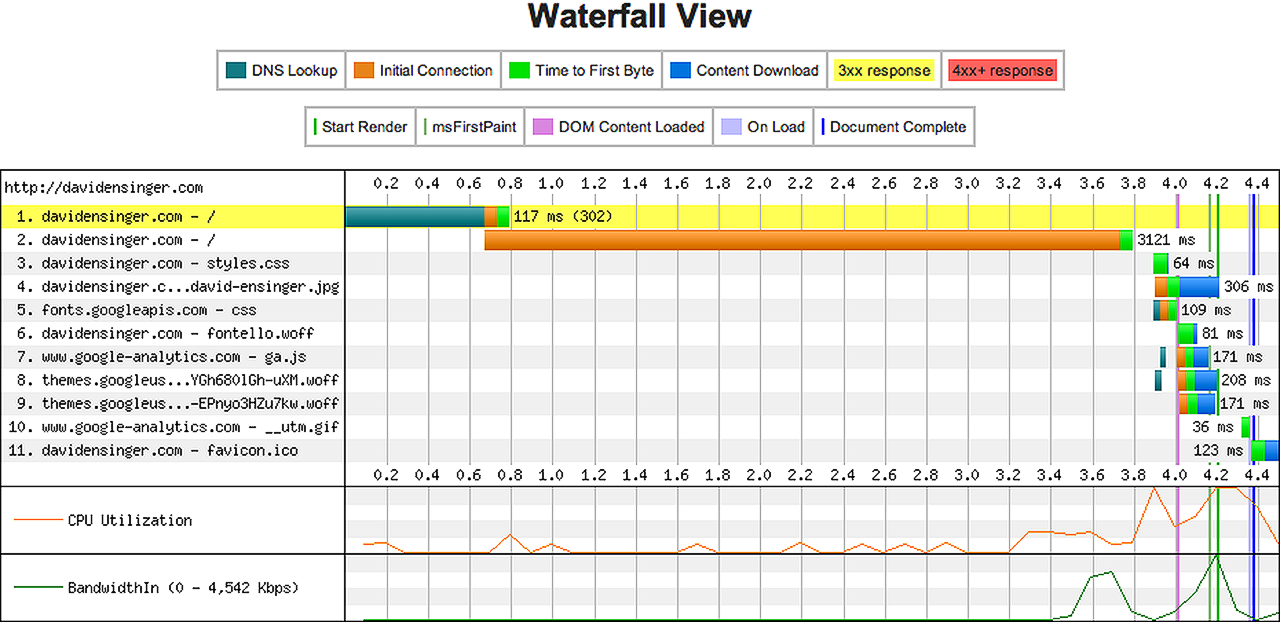
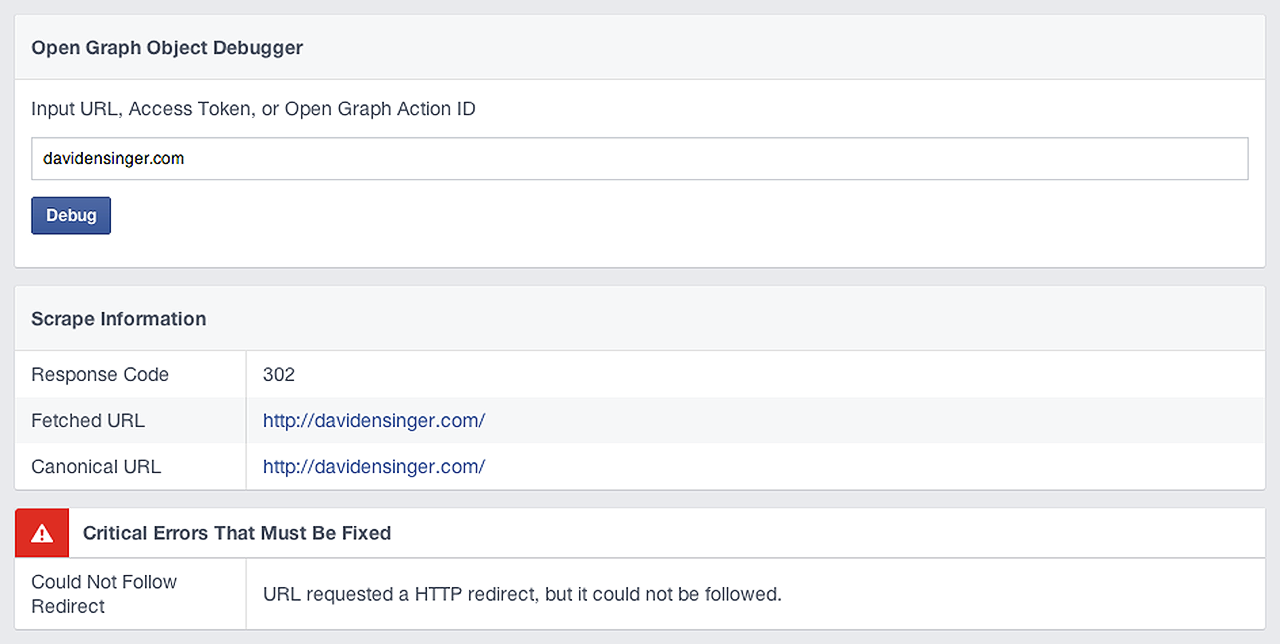
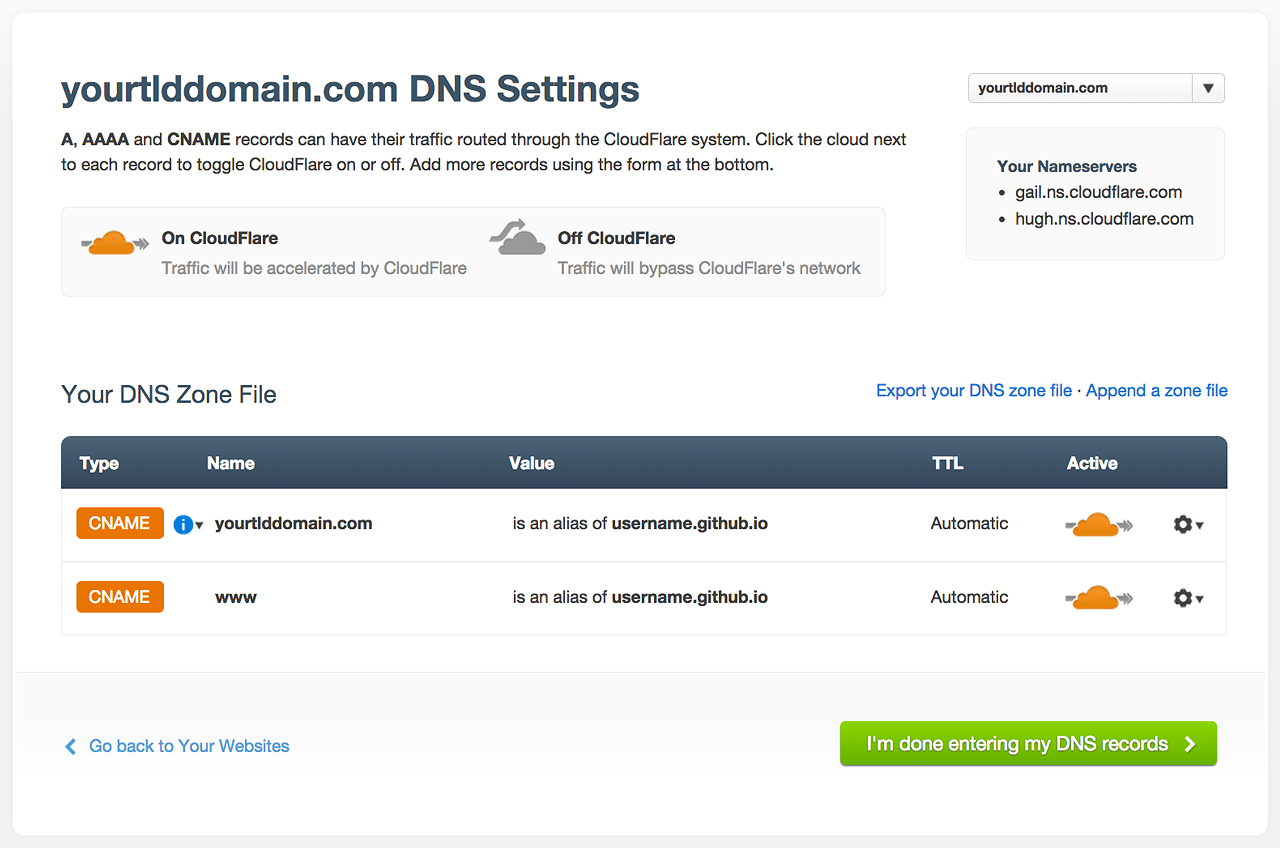
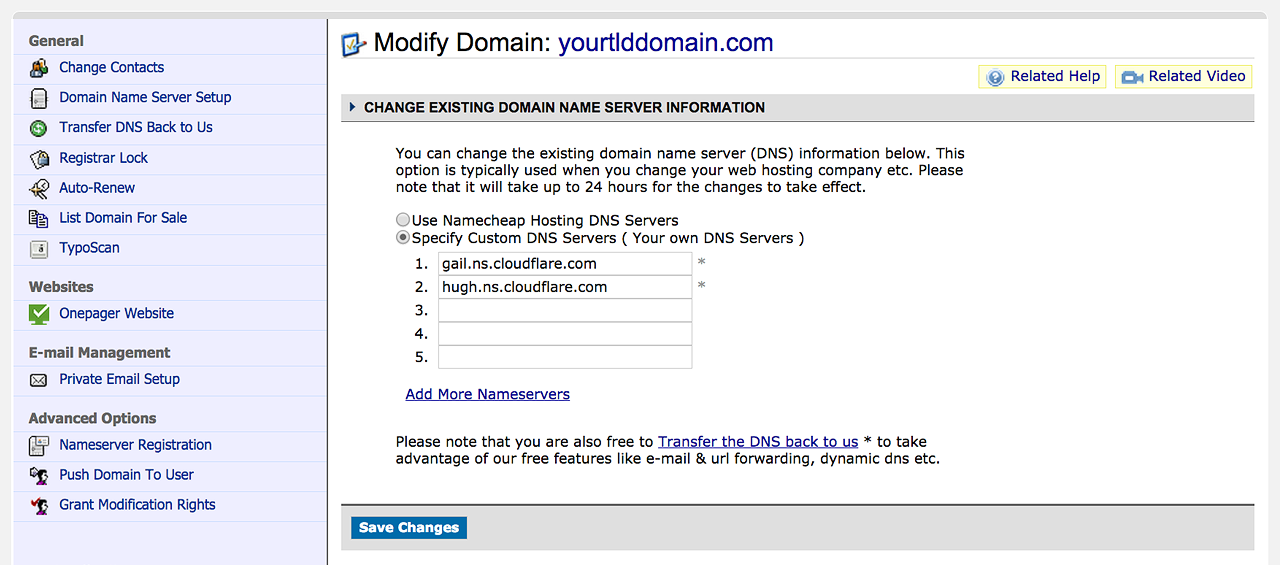
 ]]></content></entry><entry><title type="text">Transferring the DNS from Namecheap to CloudFlare for GitHub Pages</title><link rel="alternate" type="text/html" href="http://davidensinger.com/2014/04/transferring-the-dns-from-namecheap-to-cloudflare-for-github-pages/" /><id>http://davidensinger.com/2014/04/transferring-the-dns-from-namecheap-to-cloudflare-for-github-pages</id><published>2014-04-19T12:42:00Z</published><updated>2014-04-19T12:42:00Z</updated><content type="html"><![CDATA[ <p>A couple weeks ago <a href="https://twitter.com/rose_ian">@rose_ian</a> reached out to let me know that our websites, which have the identical setup, were suffering from slow initial connection times. With some legwork Ian figured out how to markedly reduce the load time for his site by hosting his DNS with <a href="https://www.cloudflare.com/">CloudFlare</a>. What follows are the steps I took to understand the issue and make the switch to CloudFlare. I’d like to give a big thanks to Ian for his initial efforts.</p><div class="yellow-box"><p><strong>Hat Tip:</strong><a href="http://ianrose.me/blog/2014/03/30/permanent-rediect-github-project-page/">Permanent Redirect GitHub Project Page to Custom Domain</a> by <a href="https://twitter.com/rose_ian">@rose_ian</a></p></div><h2 id="whats-the-issue">What’s the Issue?</h2><p>Within his first email, Ian included a link to <a href="http://www.webpagetest.org/result/140329_D9_NZT/1/details/">test results for davidensinger.com from Webpagetest.org</a>.</p><p>A quick look reveals <strong>a three second delay</strong> in loading the site, which manifests itself in the <strong>Initial Connection</strong> time, of the second request:</p><p><img src="/img/srcset/2014-04-19-initial-webpagetest-waterfall.png" alt="Initial Webpagetest waterfall chart results for davidensinger.com" class="media-full srcset-full" /></p><p>An extended look at the first request reveals our culprit, which is a <a href="http://en.wikipedia.org/wiki/HTTP_302">302 redirect</a>. We can also verify this via the <a href="https://developers.facebook.com/tools/debug">Facebook Open Graph Debugger</a>:</p><p><img src="/img/srcset/2014-04-19-initial-facebook-debugger.png" alt="Initial Facebook Debugger results for davidensinger.com" class="media-full srcset-full" /></p><h2 id="redirects">302 Redirects</h2><p>After a quick search, I found <a href="http://helloanselm.com/2014/github-pages-redirect-performance/">Analyzing the GitHub Pages Waterfall Chart</a>, wherein <a href="https://twitter.com/helloanselm">@helloanselm</a> discovers that <a href="https://pages.github.com/">GitHub Pages</a> intentionally redirects sites that are setup with DNS <code class="highlighter-rouge">A</code> records.</p><p>This is our exact setup since <a href="https://namecheap.pxf.io/c/477139/386170/5618">Namecheap</a> doesn’t support the <code class="highlighter-rouge">ALIAS</code> record, which is suggested by <a href="https://help.github.com/articles/setting-up-a-custom-domain-with-pages">Setting up a custom domain with Pages</a>. For more info see my previous post on <a href="http://davidensinger.com/2013/03/setting-the-dns-for-github-pages-on-namecheap/">Setting the DNS for GitHub Pages on Namecheap</a>.</p><p>That said, the <code class="highlighter-rouge">ALIAS</code> record doesn’t have robust support amongst registrars. I don’t have a good technical understanding of DNS, so I defer to the following post for a better explanation of the potential pitfalls of the <code class="highlighter-rouge">ALIAS</code> record.</p><div class="yellow-box"><p><strong>Warning:</strong><a href="https://iwantmyname.com/blog/2014/01/why-alias-type-records-break-the-internet.html">Why ALIAS-type DNS Records Break The Internet</a> by <a href="https://twitter.com/norbu09">@norbu09</a></p></div><h2 id="cloudflare-to-the-rescue">CloudFlare to the Rescue</h2><p>Through his research, Ian came across <a href="http://www.higherorderheroku.com/articles/cloudflare-dns-heroku/">a post at Higher Order Heroku</a> that subsequently led him to CloudFlare. It seems that a common request amongst users was for an Alias-type record to use with AWS, Heroku, and GitHub Pages. In response, CloudFlare rolled out CNAME Flattening earlier this year, which they introduced with this blog post: <a href="http://blog.cloudflare.com/introducing-cname-flattening-rfc-compliant-cnames-at-a-domains-root">Introducing CNAME Flattening</a>.</p><p>As previously stated, I don’t understand the DNS specification as well as I’d like, but CloudFlare seems confident that their new CNAME Flattening feature won’t break the Internet. It also won’t interfere with your <code class="highlighter-rouge">MX</code> records, so you need not worry about receiving your emails either. Ask Ian, as I questioned him on this point several times: “Hey still no email problems?”, to which his reply was always in the affirmative.</p><h3 id="cloudflare-support-article">CloudFlare Support Article</h3><ul><li><a href="https://support.cloudflare.com/hc/en-us/articles/200169056-CNAME-Flattening-RFC-compliant-support-for-CNAME-at-the-root">CNAME Flattening: RFC-compliant support for CNAME at the root</a></li></ul><h2 id="cloudflare-dns-settings-for-github-pages">CloudFlare DNS Settings for GitHub Pages</h2><p>Okay so you’re ready to make the move to CloudFlare, right? After you sign up (you can do the free account), you’ll then want to add your site:</p><p><img src="/img/srcset/2014-04-19-cloudflare-add-site.png" alt="CloudFlare Add Site" class="media-full srcset-full" /></p><p>Once CloudFlare finishes importing your DNS records, you’ll then want to delete both of your <code class="highlighter-rouge">A</code> records and replace them with one <code class="highlighter-rouge">CNAME</code> that points to your <strong>username.github.io</strong>. Use the <strong>@</strong> symbol to denote your root domain:</p><p><img src="/img/srcset/2014-04-19-cloudflare-cname-for-github-pages.png" alt="CloudFlare CNAME settings for GitHub Pages" class="media-full srcset-full" /></p><p>You should then have the following two <code class="highlighter-rouge">CNAME</code> records, amongst whatever other DNS records you may have:</p><p><img src="/img/srcset/2014-04-19-cloudflare-dns-settings-for-github-pages.png" alt="CloudFlare DNS settings for GitHub Pages" class="media-full srcset-full" /></p><p>Once you’ve finished modifying your DNS records with CloudFlare, you’ll want to transfer your DNS away from Namecheap.</p><h2 id="transfering-dns-from-namecheap-to-cloudflare">Transfering DNS from Namecheap to CloudFlare</h2><p>To transfer your DNS to CloudFlare, login to your Namecheap account, select the appropriate domain name, and then go to <strong>Transfer DNS to Webhost</strong>. You’ll see the following screen:</p><p><img src="/img/srcset/2014-04-19-namecheap-transfer-dns.png" alt="Transferring DNS from Namecheap to CloudFlare" class="media-full srcset-full" /></p><p>Please note that the nameservers that I used, <strong>gail.ns.cloudflare.com</strong> and <strong>hugh.ns.cloudflare.com</strong>, may not be the nameservers that you’ll need to use with CloudFlare.</p><h2 id="so-did-it-work">So Did It Work?</h2><p>After a few days with the new DNS settings at CloudFlare, I’m happy to report that the site loads much faster. The 302 redirect is gone, which reduces the <strong>Initial Connection</strong> time and subsequently the <strong>Time to First Byte</strong>:</p><p><img src="/img/srcset/2014-04-19-current-webpagetest-waterfall.png" alt="Initial Webpagetest waterfall chart results for davidensinger.com" class="media-full srcset-full" /></p><p>I’m pleased with the new results, although I’m unsure how this affects the site from the perspective of GitHub Pages. I know they offer <a href="https://github.com/blog/1715-faster-more-awesome-github-pages">protection against denial of service attacks</a>, but I don’t know if adding CloudFlare into the mix affects this in any way. If anybody has any perspective on this, please <a href="https://twitter.com/DavidEnsinger">let me know</a>.</p><div class="gray-box"><p><strong>More Info:</strong> DNSimple has a good write up about the <a href="http://support.dnsimple.com/articles/differences-between-a-cname-alias-url/">Differences between the A, CNAME, ALIAS and URL records</a>.</p></div><br><hr><p>You’ve just read about <strong><a href="http://davidensinger.com/2014/04/transferring-the-dns-from-namecheap-to-cloudflare-for-github-pages/">Transferring the DNS from Namecheap to CloudFlare for GitHub Pages</a></strong> on <strong><a href="http://davidensinger.com/">Development, design, and more by @DavidEnsinger</a></strong>.</p><p>If you’d prefer to receive your updates in tweet form, please follow me on <strong><a href="https://twitter.com/DavidEnsinger">Twitter</a></strong>, otherwise I hope you’re enjoying the feed!</p>
 ]]></content></entry><entry><title type="text">How to Include a Footer in your Site’s Feed for Jekyll</title><link rel="alternate" type="text/html" href="http://davidensinger.com/2014/03/how-to-include-a-footer-in-your-sites-feed-for-jekyll/" /><id>http://davidensinger.com/2014/03/how-to-include-a-footer-in-your-sites-feed-for-jekyll</id><published>2014-03-17T08:46:00Z</published><updated>2014-03-17T08:46:00Z</updated><content type="html"><![CDATA[ <p>Lots of folks read blogs via syndicated feeds, so it can’t hurt to provide them with a little additional content, whether it be a link to the original post, a copyright statement, or even links your social media profiles, in the footer of each feed entry.</p><h2 id="example-footer-for-feed-entry">Example Footer for Feed Entry</h2><p>The first step is to create an include for your entry footer, within which you’ll put whatever content you’d like your readers to see.</p><figure class="highlight"><pre><code class="language-html" data-lang="html"><span class="nt">&lt;br&gt;</span><span class="nt">&lt;hr&gt;</span><span class="nt">&lt;p&gt;</span>You’ve just read about <span class="nt">&lt;strong&gt;&lt;a</span><span class="na">href=</span><span class="s">"{{ site.url }}{{ post.url }}"</span><span class="nt">&gt;</span>{{ post.title }}<span class="nt">&lt;/a&gt;&lt;/strong&gt;</span> on <span class="nt">&lt;strong&gt;&lt;a</span><span class="na">href=</span><span class="s">"{{ site.url }}/"</span><span class="nt">&gt;</span>{{ site.title }}<span class="nt">&lt;/a&gt;&lt;/strong&gt;</span>.<span class="nt">&lt;/p&gt;</span><span class="nt">&lt;p&gt;</span>If you’d prefer to receive your updates in tweet form, please follow me on <span class="nt">&lt;strong&gt;&lt;a</span><span class="na">href=</span><span class="s">"https://twitter.com/DavidEnsinger"</span><span class="nt">&gt;</span>Twitter<span class="nt">&lt;/a&gt;&lt;/strong&gt;</span>, otherwise I hope you’re enjoying the feed!<span class="nt">&lt;/p&gt;</span></code></pre></figure><p>You’ll then want to include your feed footer within the include for your feed’s entries, which will probably look a lot like the following (see the <code class="highlighter-rouge"><span class="p">{</span><span class="err">%</span><span class="w"></span><span class="err">include</span><span class="w"></span><span class="err">feed-footer.html</span><span class="w"></span><span class="err">%</span><span class="p">}</span></code>):</p><figure class="highlight"><pre><code class="language-xml" data-lang="xml"><span class="nt">&lt;entry&gt;</span><span class="nt">&lt;title</span><span class="na">type=</span><span class="s">"text"</span><span class="nt">&gt;</span>{{ post.title | xml_escape }}<span class="nt">&lt;/title&gt;</span><span class="nt">&lt;link</span><span class="na">rel=</span><span class="s">"alternate"</span><span class="na">type=</span><span class="s">"text/html"</span><span class="na">href=</span><span class="s">"{{ site.url }}{{ post.url }}"</span><span class="nt">/&gt;</span><span class="nt">&lt;id&gt;</span>{{ site.url }}{{ post.id }}<span class="nt">&lt;/id&gt;</span><span class="nt">&lt;published&gt;</span>{{ post.date | date: "%Y-%m-%dT%H:%M:%SZ" }}<span class="nt">&lt;/published&gt;</span><span class="nt">&lt;updated&gt;</span>{{ post.date | date: "%Y-%m-%dT%H:%M:%SZ" }}<span class="nt">&lt;/updated&gt;</span><span class="nt">&lt;content</span><span class="na">type=</span><span class="s">"html"</span><span class="nt">&gt;</span><span class="cp">&lt;![CDATA[ {{ post.content }} {% include feed-footer.html %} ]]&gt;</span><span class="nt">&lt;/content&gt;</span><span class="nt">&lt;/entry&gt;</span></code></pre></figure><p>Also be sure to properly escape the data in your posts. I prefer to use <code class="highlighter-rouge">CDATA</code>, but Jekyll also comes with <a href="http://jekyllrb.com/docs/templates/#filters">a Liquid filter to escape XML</a>: <code class="highlighter-rouge"><span class="p">{</span><span class="err">{</span><span class="w"></span><span class="err">post.content</span><span class="w"></span><span class="err">|</span><span class="w"></span><span class="err">xml_escape</span><span class="w"></span><span class="p">}</span><span class="err">}</span></code>.</p><br><hr><p>You’ve just read about <strong><a href="http://davidensinger.com/2014/03/how-to-include-a-footer-in-your-sites-feed-for-jekyll/">How to Include a Footer in your Site’s Feed for Jekyll</a></strong> on <strong><a href="http://davidensinger.com/">Development, design, and more by @DavidEnsinger</a></strong>.</p><p>If you’d prefer to receive your updates in tweet form, please follow me on <strong><a href="https://twitter.com/DavidEnsinger">Twitter</a></strong>, otherwise I hope you’re enjoying the feed!</p>
 ]]></content></entry><entry><title type="text">Image Optimization Tools Overview</title><link rel="alternate" type="text/html" href="http://davidensinger.com/2014/02/image-optimization-tools-overview/" /><id>http://davidensinger.com/2014/02/image-optimization-tools-overview</id><published>2014-02-15T09:42:00Z</published><updated>2014-02-15T09:42:00Z</updated><content type="html"><![CDATA[ <p>Invariably, the average website gets heavier with each passing year, which results in slower page loads for visitors. Most of this increase in page weight is due to the large file sizes of images. Odds are, as a developer, you’re guilty of this slow creep too, so you should take care to optimize your images to be as lightweight as possible.</p><h2 id="online-tools">Online Tools</h2><p>The following are available to use online, for free:</p><ul><li><a href="http://www.jpegmini.com/main/shrink_photo">JPEGmini</a>: Per the docs, “Reduces the file size of JPEG photos by up to 5X”</li><li><a href="http://www.smushit.com/ysmush.it/">Smush.it</a>: Process JPG, GIF, and PNG images that are up to one megabyte in size</li><li><a href="http://compresspng.com/">Compress PNG</a>: Automatically converts BMP, ICO, GIF, and JPG to PNG</li><li><a href="http://compressjpeg.com/">Compress JPEG</a>: Automatically converts BMP and PNG to JPG</li><li><a href="https://tinypng.com/">TinyPNG</a>: In addition, has premium plugin for Photoshop</li><li><a href="http://b64.io/">b64.io</a>: Optimizes PNG, JPG, GIF or SVG and then converts to Base64</li></ul><h2 id="desktop-tools">Desktop Tools</h2><p>These are my preferred applications when optimizing images. Also I can’t believe that <strong>ImageOptim</strong> and <strong>ImageAlpha</strong> are free because <strong>they’re that good</strong>.</p><ul><li><a href="http://www.jpegmini.com/">JPEGmini</a>: An application, as well as an online tool</li><li><a href="http://imageoptim.com/">ImageOptim</a>: Losslessly optimizes PNG, JPG, and GIF</li><li><a href="http://pngmini.com/">ImageAlpha</a>: Lossy compression of 24-bit PNG</li></ul><h2 id="tooling-with-grunt">Tooling with Grunt</h2><p>If you’re using <a href="http://gruntjs.com/">Grunt</a> then check out <a href="http://blog.grayghostvisuals.com/grunt/image-optimization/">Optimizing Images with Grunt</a> and these plugins:</p><ul><li><a href="https://github.com/gruntjs/grunt-contrib-imagemin">grunt-contrib-imagemin</a>: Minify PNG, JPG, and GIF</li><li><a href="http://jamiemason.github.io/ImageOptim-CLI/">ImageOptim-CLI</a>: Uses <strong>ImageOptim</strong>, <strong>ImageAlpha</strong>, and <strong>JPEGmini</strong></li><li><a href="https://github.com/JamieMason/grunt-imageoptim">grunt-imageoptim</a>: A plugin for Grunt for <strong>ImageOptim-CLI</strong></li></ul><br><hr><p>You’ve just read about <strong><a href="http://davidensinger.com/2014/02/image-optimization-tools-overview/">Image Optimization Tools Overview</a></strong> on <strong><a href="http://davidensinger.com/">Development, design, and more by @DavidEnsinger</a></strong>.</p><p>If you’d prefer to receive your updates in tweet form, please follow me on <strong><a href="https://twitter.com/DavidEnsinger">Twitter</a></strong>, otherwise I hope you’re enjoying the feed!</p>
 ]]></content></entry></feed>